Skip to content
Founding Lifetime: every skill, foreverFirst 100 members · $99 onceUpgrade
Lookbook
Sign In
For content creators

Make animated B-roll and overlays with an AI agent

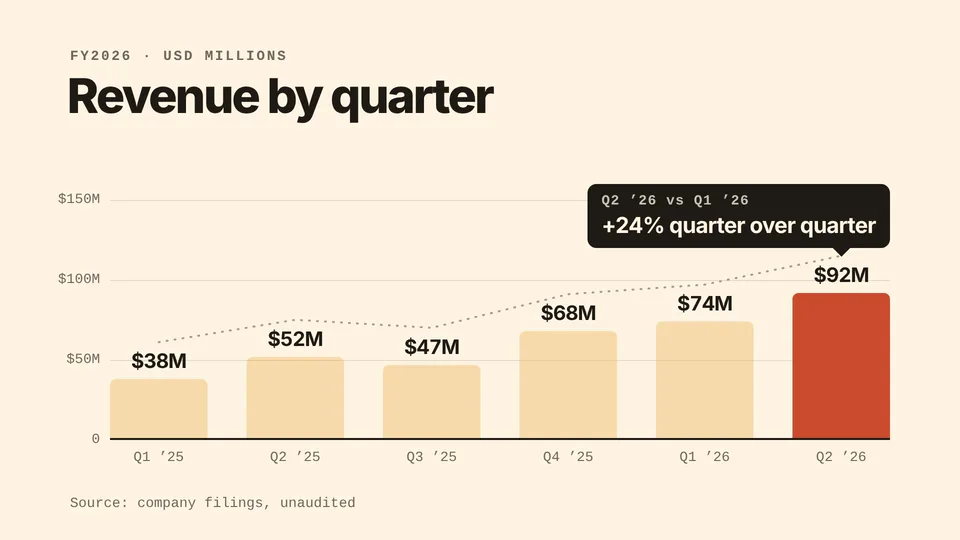
Motion graphics you cut into a video: captions, lower thirds and callouts timed to your transcript, a bar chart that grows from your CSV and a kinetic title drop. Each one renders on your own machine.

Free skills to start. Pro is $19 a month for every skill. See pricing

Skills that make animated B-roll

Video$6.90 one-time

Talking-Head Overlays

Creator Kit · Overlays · 16:9 or 9:16 · MP4 or alpha

Lower thirds, word-by-word captions, callout cards, chapter titles, a progress bar and a follow end card, all timed to your transcript. Your agent places each callout by quoting the words that trigger it, checks every moment for cut-off text and overlaps, then renders one finished MP4 over your footage or a transparent overlay for any editor.

You bring

  • Your video, 16:9 or 9:16
  • Its transcript as an SRT, VTT or word-timing JSON file

You get

  • One MP4 with the overlays over your footage, or a transparent WebM or ProRes 4444 file for your editor
  • Word-by-word captions, lower thirds, callout cards and chapter titles placed by quoting your transcript
  • Checks for contrast, cut-off text, caption lines and overlaps before it renders

Runs on

Node.js 18+, FFmpeg, Chrome, and HyperFrames via npxClaude CodeCodexCursorGitHub CopilotGemini CLIOpenCode

Also for this job

video
Data Story: BarsHyperFramesClaude CodeCodexCursor+3
Free
video
Kinetic Title DropHyperFramesClaude CodeCodexCursor+3

How it works

How to make animated B-roll with a skill

  1. Step 1

    Install an overlay or clip skill

    Copy the install prompt from a skill page and paste it into your agent. The first time, your agent opens a browser tab so you can approve it.

    curl -fsSL https://lookbk.dev/cli.js | node - add kinetic-title-drop
  2. Step 2

    Hand over the words or numbers

    For overlays, give your video and its transcript. For a chart, give a CSV and a headline. For a title drop, give three short lines.

    Make a 6-second kinetic title drop that says "Ship / it / today." in our brand orange, 1080p, for an X post.
  3. Step 3

    Drop the result into your edit

    Talking-Head Overlays writes one MP4 over your footage, or a transparent file for your editor. The chart and title clips are MP4s to cut in.

    MP4 · 6 s · 1080p

About

About these skills

Compare with asking your AI directlyWhy use a skill for animated B-roll instead of a plain prompt?
What you compareAsking your AI directlyUsing a Lookbook skill
TimingCaptions and callouts placed by guessworkEach callout is placed by quoting the words that trigger it in your transcript
Safe areasText that runs under platform buttons or off the edgeLandscape and vertical layouts that keep clear of each platform’s interface
DeliveryOne flat file, or a pile of framesOne MP4 over your footage, or a transparent WebM or ProRes 4444 file for your editor
ChartsA static picture of a chartBars grow from your CSV, a trend line draws through them and the bar that matters gets a callout
PlansFree skills stay free. Pro is $19 a month, or $69 a year.

Pro monthly

$19/month

Billed monthly.

Pro yearly

Most popular

$69/year

About $5.75 a month.

Founding Lifetime

Founding offer

$99once

For the first 100 members only.

Prices are in US dollars. Sales tax or VAT is added at checkout where it applies.

Just need one skill? A single Pro skill is $6.90. Every purchase comes with a 7-day works-or-refund promise. Compare all plans

FAQ

B-roll animation skills: FAQ

Still stuck? The guides cover installing, agents and licensing in more detail.

Read the guides

What these skills don’t do

  • Supply filmed or stock footage. They draw animation; they don’t make footage of real people.
  • Edit the footage itself. Cuts, zooms and colour work stay in your editor; Talking-Head Overlays adds graphics on top.
  • Transcribe your video. Bring an SRT, VTT or word-timing JSON file for captions and callouts.
What is B-roll animation?

B-roll is the cutaway material that plays over or between your main shots. Here it means motion graphics instead of filmed shots: captions, callouts, charts and titles that your agent renders and you cut into the edit.

How do I add captions to a video with an AI agent?

Install Talking-Head Overlays and give your agent the video and a transcript. It makes word-by-word captions from an SRT, VTT or word-timing JSON file. It doesn’t transcribe, so bring the transcript.

Will the overlays open in my video editor?

Talking-Head Overlays can write a transparent WebM (VP9 alpha) or ProRes 4444 file. Whether your editor reads those formats depends on the editor, so check its list of supported formats.

What video formats can the overlays sit on?

Videos shot 16:9 (1920×1080 or 3840×2160) or 9:16 (1080×1920 or 2160×3840). Other shapes, such as 4:5 or square, aren’t supported.

Which agents can run them?

Any agent that reads SKILL.md folders, including Claude Code, Codex, Cursor, GitHub Copilot, Gemini CLI and OpenCode.

Can I try one for free?

Yes. 1 of the 3 animated B-roll skills is free: Kinetic Title Drop. A free account is all it takes to install one. No card needed.

What does it cost?

Free skills cost nothing. A single Pro skill is $6.90, yours to keep with a year of updates. Pro is $69 a year or $19 a month for every Pro skill, and Founding Lifetime is $99 once for the first 100 members. If a skill doesn’t work with your agent, email support@lookbk.dev within 7 days of buying and we fix it or refund you.

Can I use what I make commercially?

Yes. Anything your agent makes with a Lookbook skill is yours, including for client and commercial work. You can’t resell or republish the skill packages themselves.

Find the right skill for your next b-roll animation

Free skills stay free. Pro is $19 a month, or $69 a year, for every skill.