Founding Lifetime: every skill, forever, for the first 100 members · $99 onceUpgrade now Founding Lifetime: every skill, foreverFirst 100 members · $99 onceUpgrade
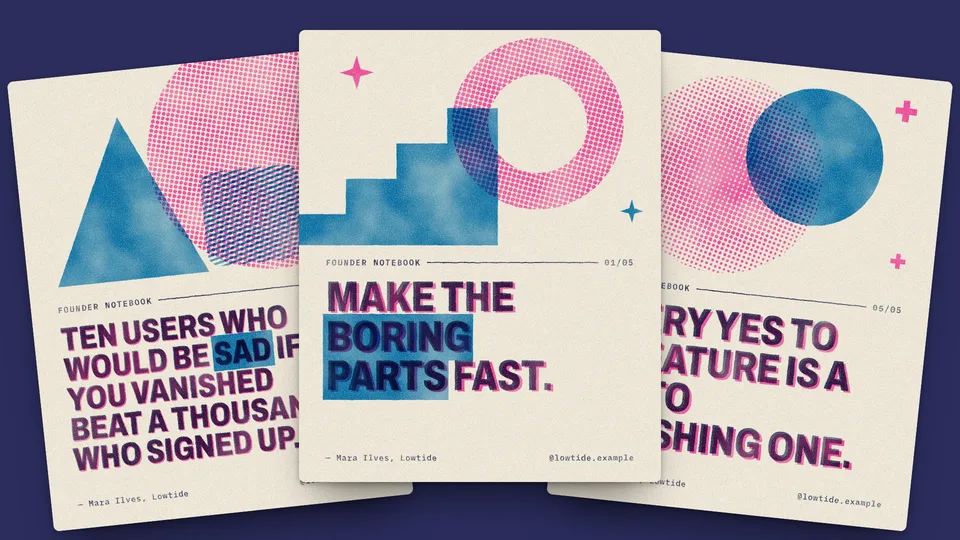
The 1200×630 card that shows when someone shares your link. Make one for every post in a single editorial look, an illustrated one for an article, or a risograph quote card. The words are real text, so they read the way you wrote them.
Link-preview images for every post in one editorial look: a serif headline set as real text, a byline and a block composition picked per post. Your agent reads your posts, renders a 1200×630 PNG for each with Chrome and wires up the meta tags.
You bring
Your posts as Markdown files, or a list of titles
Optional: your colours and author name
You get
A 1200×630 PNG for every post, with the headline set as real text
A preview page to check every card side by side
The meta tags and framework notes to wire the cards into your site
Runs on
Node.js 18+ and ChromeClaude CodeCodexCursorGitHub CopilotGemini CLIOpenCode
Make photo-led cards. The headline comes first, with art beside it.
Make animated or video link previews. The cards are still PNG files.
Publish for you. Your agent writes the PNGs and the meta tags; you upload the images wherever you host your site.
How do I add an OG image to every blog post?
Point Editorial OG Card at your folder of posts. It turns each post’s front matter into a card, renders a 1200×630 PNG for each and gives you the meta tags and framework notes to wire them in. Run it again when you add posts.
What size should an OG image be?
Every skill on this page renders 1200×630, and Editorial OG Card checks that each PNG comes out at that size.
Is the text in the image spelled right?
It matches what you gave the skill. The words are set as real text and rendered with Chrome, rather than painted by a model, so the image holds exactly your headline or quote.
Can an OG image have an illustration instead of just text?
Yes. Article Hero Illustration draws a flat riso-print illustration for your article and can add a 1200×630 title card, with the title beside the picture. It doesn’t make photographs.
Which agents can run them?
Any agent that reads SKILL.md folders, including Claude Code, Codex, Cursor, GitHub Copilot, Gemini CLI and OpenCode.
Can I try one for free?
Yes. 1 of the 3 OG image skills is free: Editorial OG Card. A free account is all it takes to install one. No card needed.
What does it cost?
Free skills cost nothing. A single Pro skill is $6.90, yours to keep with a year of updates. Pro is $69 a year or $19 a month for every Pro skill, and Founding Lifetime is $99 once for the first 100 members. If a skill doesn’t work with your agent, email support@lookbk.dev within 7 days of buying and we fix it or refund you.
Can I use what I make commercially?
Yes. Anything your agent makes with a Lookbook skill is yours, including for client and commercial work. You can’t resell or republish the skill packages themselves.