Make motion graphics with your AI agent
Short, designed motion pieces from a few lines of text or a CSV: kinetic titles, growing bar charts, countdowns and game-style promos. Your agent writes the timeline and renders the MP4 locally.
Kinetic Title Drop is free with an account. See pricing
- Length
- 6 to 20 seconds
- Resolution
- 1080p MP4
- Shapes
- 16:9 and 9:16 where the skill offers it
- Paid API
- None: renders on your machine
6 skills
The skills that make it
Every preview below was rendered by the skill itself. Hover a card to play it, or open it for the examples, the install prompt and what it needs.
- Kinetic Title DropClaude CodeCodexCursor+3 more agents
- Data Story: BarsClaude CodeCodexCursor+3 more agents
- Countdown TeaserClaude CodeCodexCursor+3 more agents
- Pixel Quest PromoClaude CodeCodexCursor+3 more agents
- Changelog ReelClaude CodeCodexCursor+3 more agents
- Launch Scene KitClaude CodeCodexCursor+3 more agents


Storyboard
How a short motion piece is built
- 01
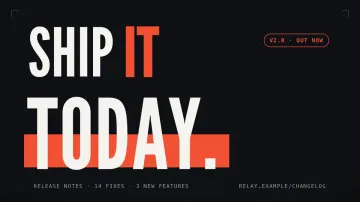
The words
Three lines or a headline: the piece is planned around what it has to say.
Kinetic Title Drop - 02
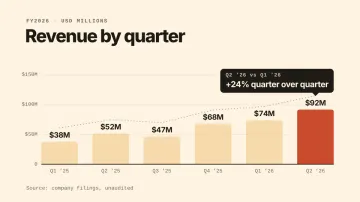
The data
A CSV becomes bars that grow with counting values and a callout on the one that matters.
Data Story: Bars - 03
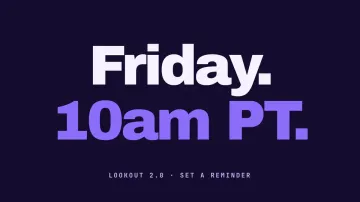
The beat
Every hit sits on a grid, so type, color and cuts move together.
Countdown Teaser - 04
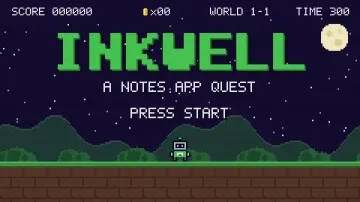
The play
Game-style motion, such as a pixel hero grabbing a coin per feature.
Pixel Quest Promo - 05

The end card
Your link or reveal, held still long enough to read.
Changelog Reel
By job
Which skill to start with
An announcement post
Three beats of heavy type in your colors, six seconds long.
Start with Kinetic Title DropA metric worth sharing
Bars, a trend line and a callout from your own CSV.
Start with Data Story: BarsA side-project launch
An 8-bit platform game where each stage is a feature.
Start with Pixel Quest PromoA weekly update
Your git log printed in a terminal, then three highlights.
Start with Changelog Reel
How it works
Install, describe, get the MP4
The commands below are Kinetic Title Drop's, which is free. Every skill on this page installs the same way.
- Step 1
Install the skill
Paste the install prompt into Claude Code, Codex or Cursor, or run the one-line command. The skill lands as a SKILL.md folder your agent reads.
curl -fsSL https://lookbk.dev/cli.js | node - add kinetic-title-drop - Step 2
Describe the video
Say what it is for, the words it should show and where it will be posted. Point the agent at your site, a CSV or a transcript when the skill uses one.
Make a 6-second kinetic title drop that says "Ship / it / today." in our brand orange, 1080p, for an X post. - Step 3
Get the MP4
The agent writes a storyboard, checks every frame for cut-off text and renders on your machine. You get an MP4 and the editable source.
MP4 · 6 s · 1080p
A prompt to start from
Paste it after installing, then change the words, the length and the place you will post it.
Make a 6-second kinetic title that says "Faster / builds / today." in our green, then a 12-second bar chart from usage.csv that calls out the best month. 1080p for LinkedIn.
Compare
A skill, a video model or a studio
What changes when the video is built by code your agent runs, rather than generated or commissioned.
| What you compare | Prompting a video model | Hiring a studio | A Lookbk skill |
|---|---|---|---|
| Your real product on screen | Invents an interface that looks close | Yes, after a capture session | Your agent captures your real screens or uses your data |
| Text that reads correctly | Letters often warp | Yes | Every word is real type, checked before the render |
| Change one line later | Generate again and hope | A revision round | Edit the line and render again in minutes |
| Numbers you can trust | Charts are drawn, not computed | Yes, typed by hand | Bars and counters come straight from your CSV |
| Cost | Credits for every try | Thousands per film | Free skills to start, Pro for the whole catalog |
FAQ
Questions
Still stuck? The guides cover installing, agents and licensing in more detail.
Read the guidesWhat counts as motion graphics here?
Designed animation made of type, shapes and data rather than filmed footage: kinetic titles, animated charts, countdowns and game-style promos.
Does a video model draw the frames?
No. The skills build each frame from HTML, SVG and a timeline, then render it with headless Chrome and FFmpeg. Text stays sharp and numbers stay exact.
Can I use my brand colors and fonts?
Yes. Give the agent your palette and the skill applies it to every beat; most skills also take a font.
Is any of it free?
Kinetic Title Drop and Pixel Quest Promo are free with an account. The rest are Pro or a one-time purchase each.
Can it make vertical video?
Countdown Teaser renders 9:16 for Stories and Reels or 16:9 for X from the same brief. The others render 16:9 at 1080p.
Can I edit after the render?
Yes. The project stays on your machine, so you can change a word or a value and render again.
Keep exploring
More ways to make video with an agent
6 skills
Launch Film Skills
Launch films your agent renders to MP4

5 skills
Creator Animations
Overlays and intros for YouTube, Shorts, Reels
122 videos
Opus 5.5 videos
Motion pieces Opus 5.5 coded, with prompts
HyperFrames tutorial
How HTML becomes a frame-perfect MP4.
HyperFrames vs Remotion
Two ways to render video from code, side by side.
Every video skill
The whole video shelf, free and Pro.
Turn the next announcement into motion.
Free skills stay free. Pro is $79 a year for every skill, or $9.99 a month for 10 skills a month.