The best website hero animations to build with Claude Code
Claude Code can write an animated hero from a prompt, but a first try tends to look like every other one. These skills give it a finished design to fill in: your words and colors go into one file, the build checks contrast and layout, and you get a page, an embed to paste into your site and a video of it.
Free skills to start. Pro is $99 a year for every skill, or $19 a month for 10. See pricing


The picks
From the Lookbk catalog only. Each pick uses a different technique, so the list covers more than one look: a scripted product demo, a scroll-driven map, a shader sky, generative ink, a self-building poster, live ASCII and plain 2D canvas. They run with Node.js 18 or newer, Chrome and ffmpeg for the video, and work the same in Codex, Cursor and other agents that read SKILL.md. The last pick is free.
- Cursor Tour HeroFFmpegClaude CodeCodexCursor+3 more agents
01 · Motion Heroes · Pro
Cursor Tour Hero
One HTML file + embed · 1080p MP4 and poster
Shows your product working instead of describing it. A scripted cursor checks off a list, flips a switch and presses the main button in a window built from your real workflow. The obvious pick for a SaaS home page.
Needs: Node.js 18+, Chrome for the checks and recording, ffmpeg for the video
See what Cursor Tour Hero makes - Scroll Route HeroFFmpegClaude CodeCodexCursor+3 more agents
02 · Motion Heroes · Pro
Scroll Route Hero
One HTML page + embed · MP4 + poster
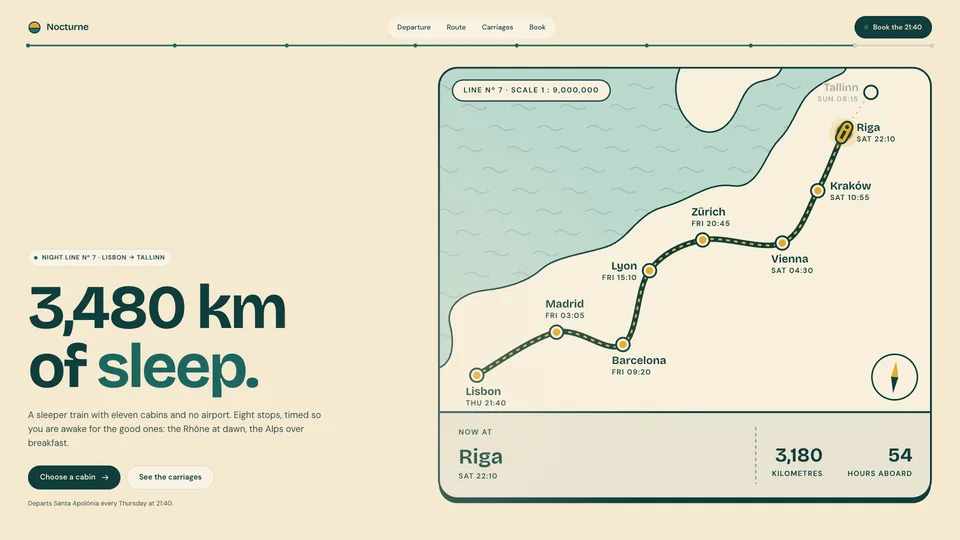
Scroll-driven: the hero pins and a travel-poster route draws itself station by station, with a ticket stub that tracks progress. For journeys, roadmaps, onboarding steps or anything with stops.
Needs: Node.js 18+, Chrome for the checks and recording, ffmpeg for the video
See what Scroll Route Hero makes - Cloud Sky HeroWebGLClaude CodeCodexCursor+3 more agents
03 · Motion Heroes · Pro
Cloud Sky Hero
One HTML file + embed · 1080p MP4 and poster
A shader sky with three layers of clouds, two behind a huge headline and one drifting across it. The build checks every line of text against every sky and cloud color that can sit behind it.
Needs: Node.js 18+, Chrome for the checks and recording, ffmpeg for the video
See what Cloud Sky Hero makes - Ink Flow HeroFFmpegClaude CodeCodexCursor+3 more agents
04 · Motion Heroes · Pro
Ink Flow Hero
Animated hero section · page + embed + 1080p video
Generative art that you can rely on: a seeded flow field draws sumi brush strokes on washi paper, and the same seed always draws the same scroll, so the hero looks the same in review and in production.
Needs: Node.js 18+, Chrome (or Chromium/Edge) for the checks and recording, ffmpeg for the video
See what Ink Flow Hero makes - Bauhaus Timeline HeroFFmpegClaude CodeCodexCursor+3 more agents
05 · Motion Heroes · Pro
Bauhaus Timeline Hero
Animated hero section · page + embed + MP4
A Bauhaus poster that builds itself one shape at a time, with a timeline panel that shows every tween as a bar. Good for design and animation tools that want to show how motion is made.
Needs: Node.js 18+, Chrome, and ffmpeg for the video
See what Bauhaus Timeline Hero makes - ASCII Signal HeroWebGLClaude CodeCodexCursor+3 more agents
06 · Motion Heroes · Pro
ASCII Signal Hero
WebGL2 glyph hero · page + embed · 1080p MP4
A 3D object or your own picture rendered live as ASCII glyphs or dither dots beside a headline that types itself on. The headline stays real, selectable text. Made for developer tools.
Worth knowing: Visitors need WebGL2 for the live effect.
Needs: Node.js 18+, Chrome (or Chromium/Edge) and ffmpeg; visitors need WebGL2 for the live effect
See what ASCII Signal Hero makes - Pastel Orrery HeroFFmpegClaude CodeCodexCursor+3 more agents
07 · Motion Heroes · Pro
Pastel Orrery Hero
HTML page + paste-in embed + 1080p MP4 · 2D canvas, no libraries
Playful and light: orbits draw themselves in, planets glide round and a smiling core morphs from planet to star to heart. Plain 2D canvas with no libraries.
Needs: Node.js 18+, Chrome (or Chromium/Edge) for checks and recording, ffmpeg for the video
See what Pastel Orrery Hero makes - Waitlist GlowChromeClaude CodeCodexCursor+3 more agents
08 · Landing Pages · Free
Waitlist Glow
One HTML file · Formspree, Netlify, Buttondown or your endpoint
Not a Motion Hero, but free: a one-screen waitlist page with a breathing gradient glow and a sign-up form that really works. Use it to try the whole workflow in Claude Code before you buy anything.
Needs: Node.js 18+, Chrome for the checks, and a form service
See what Waitlist Glow makes


Install
Install a pick with your agent
Every pick is a SKILL.md folder, so it installs the same way in Claude Code, Codex, Cursor and other agents. The example below uses Waitlist Glow, which is free; each skill page has its own prompt.
1. Paste the install prompt
Your agent runs the installer. The first time, it shows a sign-in link so you can approve it in the browser.
Install the "Waitlist Glow" skill from Lookbk (https://lookbk.dev/skills/waitlist-glow).
1. Run: curl -fsSL https://lookbk.dev/cli.js | node - add waitlist-glow
2. If it prints a sign-in link, show it to me. When I say I approved it, run the same command again.
3. When the install finishes, read the SKILL.md it installed and tell me what you need from me to make the first result.
Or run it in a terminal
curl -fsSL https://lookbk.dev/cli.js | node - add waitlist-glow2. Start a new session
Agents load skills when a session starts. The installer writes the folder where your agent looks:
- Claude Code
- ~/.claude/skills/waitlist-glow
- Codex
- ~/.agents/skills/waitlist-glow
- Cursor
- ~/.agents/skills/waitlist-glow
3. Ask for the result
Describe it in plain words, for example:
Make a Waitlist Glow page for soon.example that posts emails to our Formspree form, with a countdown to December 1.
Another agent? Install a skill in any agent
FAQ
Questions
Still stuck? The guides cover installing, agents and licensing in more detail.
Read the guidesCan’t Claude Code write a hero animation without a skill?
It can, and for a quick experiment that is fine. A skill fixes the design up front and adds what a single prompt usually skips: contrast and layout checks at four widths, a still for reduced motion, and a smooth video recorded frame by frame.
How do I install a hero skill in Claude Code?
Paste the install prompt from the skill’s page into Claude Code, or run the install command in a terminal. Inside Claude Code it installs into ~/.claude/skills/<skill>. Start a new session so Claude Code picks it up.
Will the hero work in my Next.js or React site?
Each hero writes a whole page and an embed: an HTML section plus its assets, to paste into any site. Ask Claude Code to wrap the embed in a component for your framework.