The page this skill built from examples/ossory, working in your browser. Opens in a new tab. Also: Verglas.
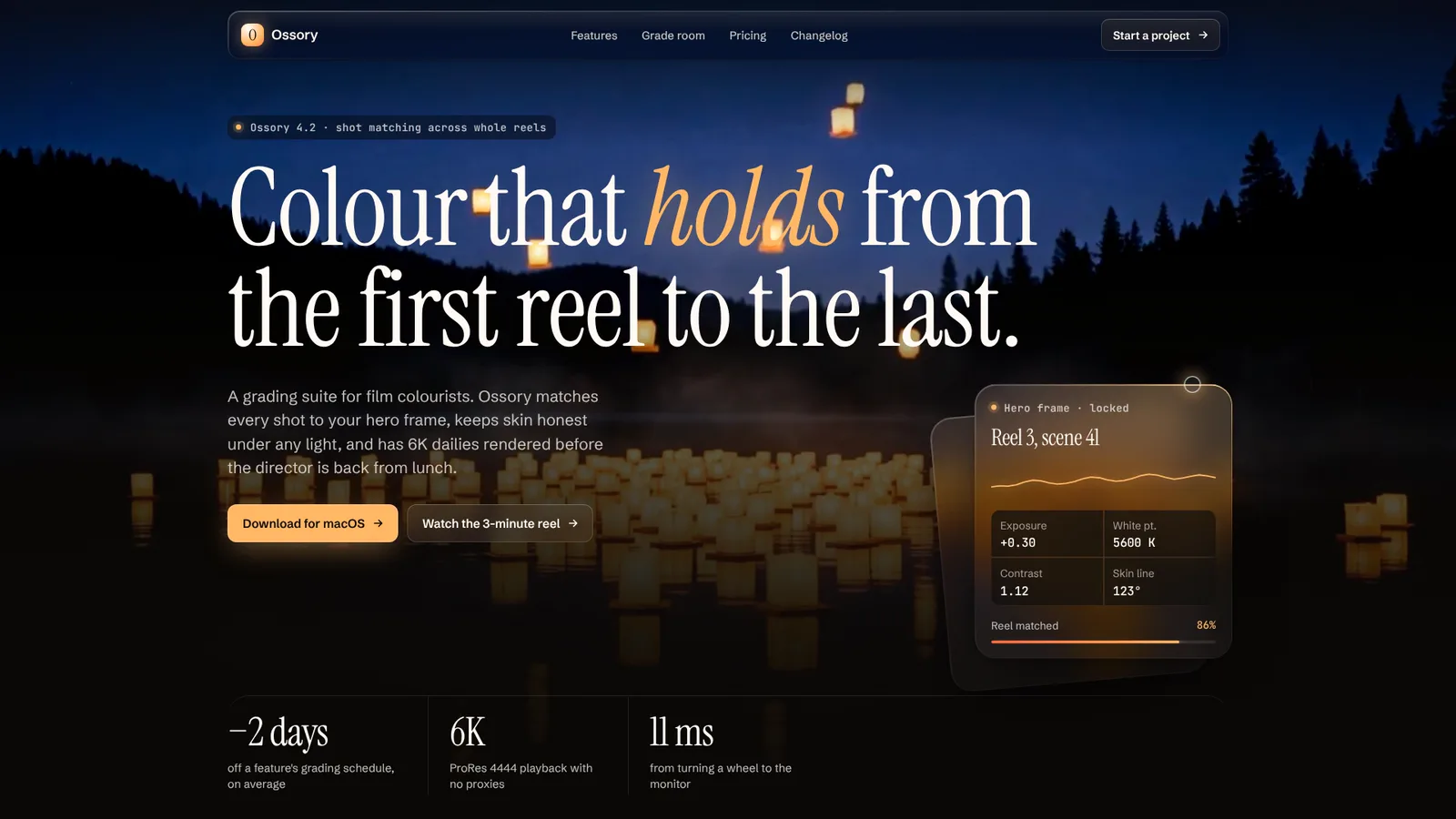
16-second example rendered by this skill from examples/ossory · 1280×720
Example settingswhat each example above was built from
examples/ossorypage.json
- Brand
- Ossory
- Headline
- Ossory · Colour grading for film colourists
examples/verglaspage.json
- Brand
- Verglas
- Headline
- Verglas · The time-series database for the edge
What you get
- A whole landing page (bar, hero, features, product window, pricing, closing band, footer) in your words, numbers and links
- Glass with real backdrop blur and an edge that catches the pointer's light, and a roaming light on touch screens
- A product window built from your own numbers: list, metric, chart and table, tilting in and landing flat with three notes
- Your own three lights and an editorial or technical type pairing, with the tokens and component rules written down
- Designed phone layouts and a reduced-motion version where the light rests and everything is shown
- Checks at 390, 768, 1024 and 1440 px for overflow, text size, AA contrast, clipping, focus rings, blur and reduced motion
- A 1080p video of the scripted scroll with a pointer lighting the glass, rendered frame by frame
- Open-source licenses for every part it builds on
Good fit
- Developer tools and infrastructure get the technical pairing, as Verglas does in ice mint: a condensed grotesque with a mono, a terminal hero, a spec table and a live console.
- Creative software, studios and hardware get the editorial pairing, as Ossory does in sodium amber: a serif with one lit italic word, a full-bleed film hero, a pricing ledger.
- Teams that want glass done properly, with real blur, one light colour story and AA contrast checked inside every panel, instead of a frosted-card template.
Not for
- Light themes: the system is dark by design and the build refuses a light ground
- New sections or other layouts: the seven parts are fixed, the words, numbers, lights and type pairing are yours
- A real screenshot of your app in the window: it is drawn from your numbers (a list, a metric, a chart, a table)
- Checkout or forms: the buttons are links to your own pages
About this skill
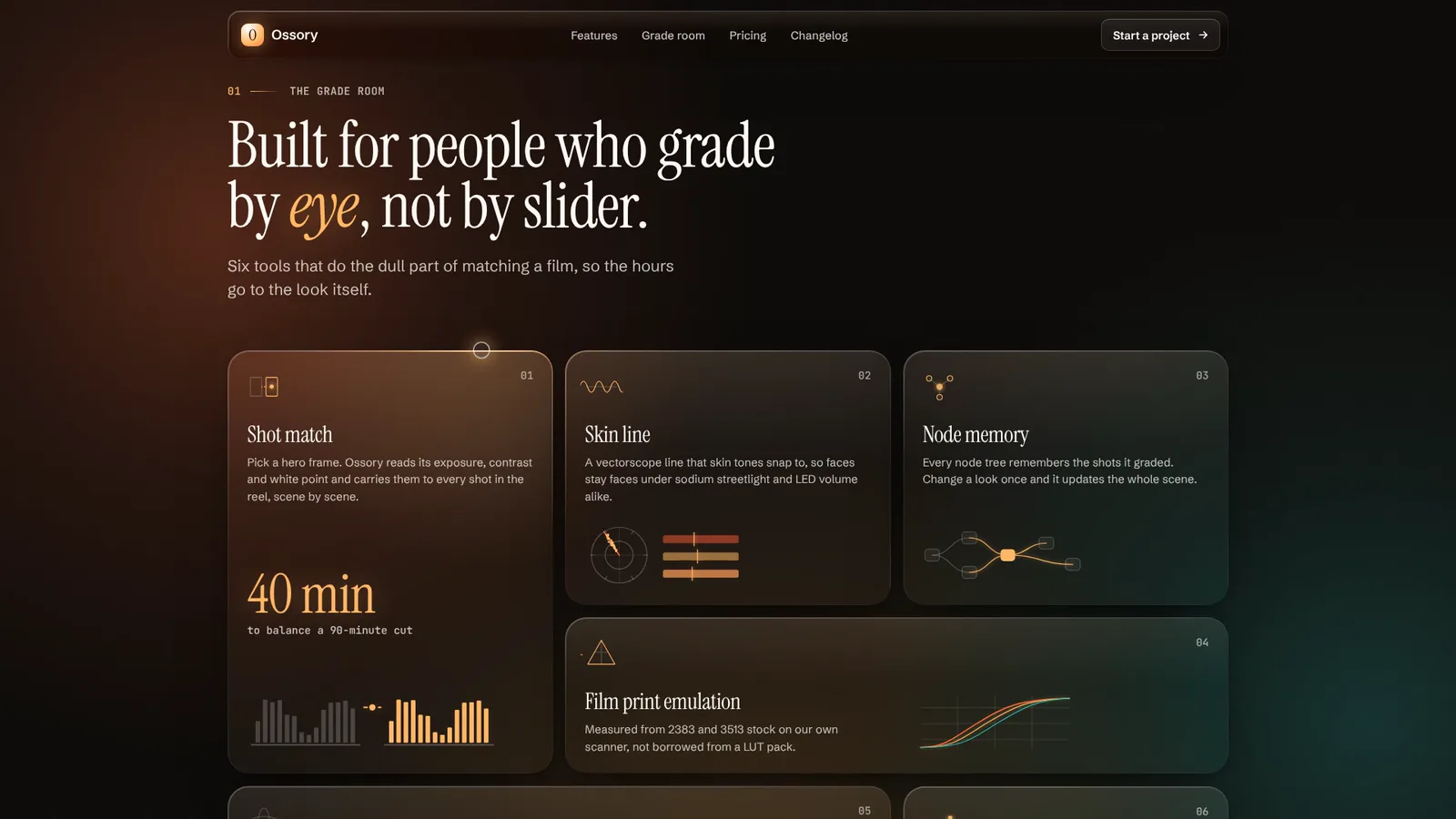
A complete landing page in a strict dark glass design system, built from one page.json: a near-black ground with slow volumetric light behind it (three drifting orbs and a beam), layers of translucent glass with real backdrop blur, and a hairline edge on every panel that lights up where the pointer is. Every section has at least two layouts, so two pages never share a skeleton: the hero is a split or a full-bleed film with the glass card crossing the end of the headline so the type blurs through it, or a stack with a terminal strip and the card on its corner; features are a six-tile bento where each tile carries a micro drawing of the feature (a vectorscope, a node graph, print curves) or four tiles over a spec table; the product is a data console or a filmstrip window that tilts back in perspective and lands flat, with three glass notes in its gutter that never cover its data; pricing is three cards or a ledger of rows with a monthly/yearly switch; the close ends on a full-width wordmark or a compact centred band. Each page chooses its own three lights and one of two type pairings, so it never reads as a purple SaaS template: Ossory, a colour grading suite, is sodium amber and Instrument Serif over lanterns on a lake; Verglas, an edge database, is ice mint and condensed Bricolage Grotesque over kelp in shafts of light. The tokens and component rules ship in SKILL.md; the build checks every length and every light, the check tests four widths for overflow, text size, AA contrast, clipping, focus rings, real blur, the pointer light and reduced motion, and a recorder makes a 1080p video of the scroll with a drawn pointer.
Example request
Use Dark Glass Landing to build our launch page: our three lights are copper, smoke blue and bone, technical type, our six features, the dashboard numbers from the screenshot, three plans and our footer links.
How it works
Your agent
- 1
Collect the content
Every number, price, name and claim must come from the person.
- 2
Write page.json
Then change at least three of the five layouts from the example you copied, so the page does not read as a reskin of it.
- 3
Build
It lists every problem at once (a missing field, a line too long for its place, a ground too light, a light too dim for text, a plan with a monthly but no yearly price, a file that isn't there) and writes nothing until they're fixed.
- 4
Check
It serves the page and opens it at 390, 768, 1024 and 1440 px wide and with reduced motion at 390 and 1440, scrolls through every section, waits for the reveals, and fails on script errors, sideways scrolling, text under 16 px on a phone or 14 px elsewhere, text under WCAG AA contrast (including over the film and inside glass), text cut off or off the screen, links without an address, a keyboard focus that can't be seen (it presses Tab through the page), glass without a real backdrop blur, an edge that doesn't light when the pointer comes near, a billing switch that doesn't answer, reduced motion that still moves, a line of type starting with punctuation, a product note over any text in the window (or more than 24px into its frame), glass running past the screen's edge, a floating panel touching the hero headline, and wordmark descenders reaching the legal rule.
- 5
Look at it
Open the address it prints.
- 6
Record the video (optional)
Writes
out/preview.mp4(1920×1080, 30 fps, 16 seconds: the page scrolls from the hero to the footer, each section resting with its heading fully below the bar, while a drawn pointer parks on panel edges (never on words) so the edge light shows; the product window pauses mid-tilt, then lands flat; the switch goes to yearly) andout/poster.png. - 7
Hand it over
Use
out/index.htmlas the page and uploadout/assets/next to it.
- 1
You get
- out/preview.mp4
- out/poster.png
- out/index.html
What you need
- Node.js 18 or newer. Nothing to install.
- Chrome, Chromium or Edge, for the checks and the video (the scripts find it; set
CHROME_PATHif they don't). - ffmpeg for the video only (
brew install ffmpeg,winget install ffmpeg,apt install ffmpeg; or setFFMPEG_PATH). - Internet access when the page is opened, for the Google Fonts of the pairing. Without them system fonts stand in.
Last checked Nov 2, 2026: the package’s own build and render commands ran and passed.
If something goes wrong
The build says a light is too dim
The key and warm lights carry small text; pick a lighter tint of the same hue.
The glass looks flat
There is nothing bright behind it. Give the hero a film, or brighten
warmandcool; the orbs are what the blur shows.The check says text is cut off in the window
A sidebar label or table value is too long for the column; shorten it.
What’s in the download
- SKILL.md20.4 KBthese instructions, with the tokens and component rules.
- examples/
- examples/ossory/10.3 KBthe two examples, each with its film and poster. · 1 file
- examples/verglas/11.2 KB1 file
- kit/
- kit/glass.css52.7 KBthe whole system (tokens, glass, light, every section, phones, reduced motion).
- scripts/
- scripts/kit/
- scripts/kit/build.mjs36.2 KB
- scripts/kit/cdp.mjs4.90 KB
- scripts/kit/check.mjs19.1 KB
- scripts/kit/record.mjs5.72 KB
- scripts/kit/runtime.js20.4 KB
- scripts/kit/schema.mjs6.62 KB
- scripts/kit/serve.mjs2.47 KB
- scripts/build.mjs146 Bentry points; the work is in
scripts/kit/(schema.mjslists every field and limit,build.mjsrenders the page,runtime.jsis the light and motion,check.mjs,record.mjs,serve.mjs,cdp.mjs). - scripts/check.mjs146 B
- scripts/chrome.mjs3.63 KBfinds Chrome, Chromium or Edge.
- scripts/record.mjs148 B
- scripts/serve.mjs146 B
- NOTICE.md1.43 KB
- TESTED.json409 B
18 files · 196 KB · installs to ~/.claude/skills/dark-glass-landing for Claude Code and ~/.agents/skills/dark-glass-landing for other agents
Credits and licenses: NOTICE.md plus any LICENSE files inside the ZIP.
Similar Skills
View allDetails
- Output
- A whole landing page in one dark glass system · real backdrop blur, pointer-lit edges, volumetric light · two layouts for every section · two art directions with different skeletons · 1080p video of the scroll
- Needs
- Node.js 18+, and Chrome for the checks; ffmpeg only for the video
- Series
- Landing Pages · 5 skills
- Updated
- Nov 2, 2026
- Checked
- Nov 2, 2026: its own commands ran and passed. That is a working check, not a security audit.
Written for
See all 31 agents that read skill folders.
Install guides
For your agent
Generates with
Installed it? Tell others how it went. Reviews come from people who installed this skill.
Write a reviewFAQ
Does the edge light work on phones?
There is no pointer on a phone, so a soft light roams slowly over the screen instead and the edges catch it as it passes. On a computer the light follows the mouse, and hands back to the roaming light after a few still seconds.
Can I use my own colours and fonts?
The three lights and the ground are yours (the build checks they are dark enough and bright enough for text). The type comes as two tested pairings, editorial and technical; other fonts are not a setting, because the sizes and spacing are drawn for them.
What happens with reduced motion?
Nothing moves on its own: the light rests, every section is shown, the product window lies flat and the film shows its poster. The edges still answer the mouse and the billing switch changes at once. The check fails if anything still drifts.
Which agents is Dark Glass Landing written for?
Any agent that reads SKILL.md folders, including Claude Code, Codex, Cursor, GitHub Copilot, Gemini CLI and OpenCode.
Do I own what I make with it?
Yes. Everything your agent makes with this skill is yours, including for client and commercial work.
What if it doesn’t work for me?
Email support@lookbk.dev within 7 days of buying and we’ll fix it or refund you.
Credits and licensesWritten by Lookbk
the Dark Glass system, both examples and the kit, all written for Lookbk; the two hero films are Lookbk's own generated Loop Heroes footage. The fonts are from Google Fonts. Written by Lookbk, no third-party code.
Credits and licenses for the open-source software and fonts it uses are in NOTICE.md inside the download.