The page this skill built from examples/ashby, working in your browser. Opens in a new tab. Also: .
15.7-second example rendered by this skill from examples/ashby · 1280×720
What you get
- A self-contained page with the section, and a paste-in embed
- A programme chart with every step drawn to scale and the buyer's hours marked and added up
- A scroll-linked cursor, a rail whose length follows the days, and week ticks where you will meet them
- A sticky desk with 9 kinds of drawn deliverable, earlier papers kept in a pile, logs that print day by day
- Two-column, tablet, phone and no-JavaScript layouts, with reduced motion
- Build-time arithmetic: no gaps or overlaps unless marked parallel, hours by a stated rounding rule, payments to 100% or the fixed fee
- Checks at 4 widths, including label collisions and 3:1 for the bars, plus a 15.7-second 1080p preview recorder
- Open-source licenses for every part it builds on
Good fit
- A renovation, build or install firm that wants buyers to see the real weeks and when they will be needed.
- A design or brand studio that sells fixed phases and wants each fee tied to a file the client keeps.
- A consultancy or onboarding team that wants to show what the client gives and gets at every stage.
Not for
- Processes without real durations: the steps must have days, or the chart has nothing to draw
- Feature lists or product tours: use a feature section instead
- Projects longer than 520 working days or with more than 7 steps
- Steps that hand the buyer nothing: every step must name what they get
About this skill
The process section of a service, set as the schedule page of a signed proposal instead of numbered circles. One process.json gives 3 to 7 steps, each saying who does it, how long it takes, what the buyer gives, what they get and what they pay. A programme chart draws every step to scale on one calendar of working weeks, and a lane marks each hour the buyer is needed and adds them up. As you scroll, a cursor moves through the programme, a rail whose length follows the days fills in, and a sticky desk shows each step's deliverable, drawn as a real document: a measured plan, a quote that adds up, a dated log, a certificate. Earlier papers stay in a pile. The build checks that the schedule, hours and payments add up.
Example request
A how-it-works section set as a project schedule on oat paper: steps drawn to scale on a 12-week programme with the client's hours marked, a green cursor, and the current deliverable on a gridded desk.
How it works
Your agent
- 1
Collect the schedule
From the person, or from their proposal or their current page, for each stage of the work.
- 2
Write process.json
Copy the example closest in spirit and replace every value.
- 3
Build
It lists every problem at once and writes nothing until they are fixed: a gap or an overlap in the schedule (mark a step
"parallel": trueif it really runs alongside), steps that do not add up tocalendar.total, a statedyourTime.hoursthat the touchpoints do not round to, percentages that do not make 100 or amounts that do not make the fixed fee, a quote whose lines do not add up, a touchpoint or log line outside its step, a step withoutget, a line too long for its place, a colour pair under its minimum, an exclamation mark or an em dash. - 4
Check
It runs at 390, 768, 1024 and 1440 px, with reduced motion at 390 and 1440 and with JavaScript off at 390 and 1440.
- 5
Look at it
Open the address it prints and scroll through on a laptop and a phone.
- 6
Put it on the site
Paste
out/process-embed.htmlwhere the section belongs. - 7
Record a preview (optional)
The video follows a fixed script: 1.6 s on the intro and the programme, then for each step a 1.1 s move and a 1.6 s dwell, and 0.6 s more at the end (15.7 s for five steps).
- 1
You get
- out/process-embed.html
- out/index.html
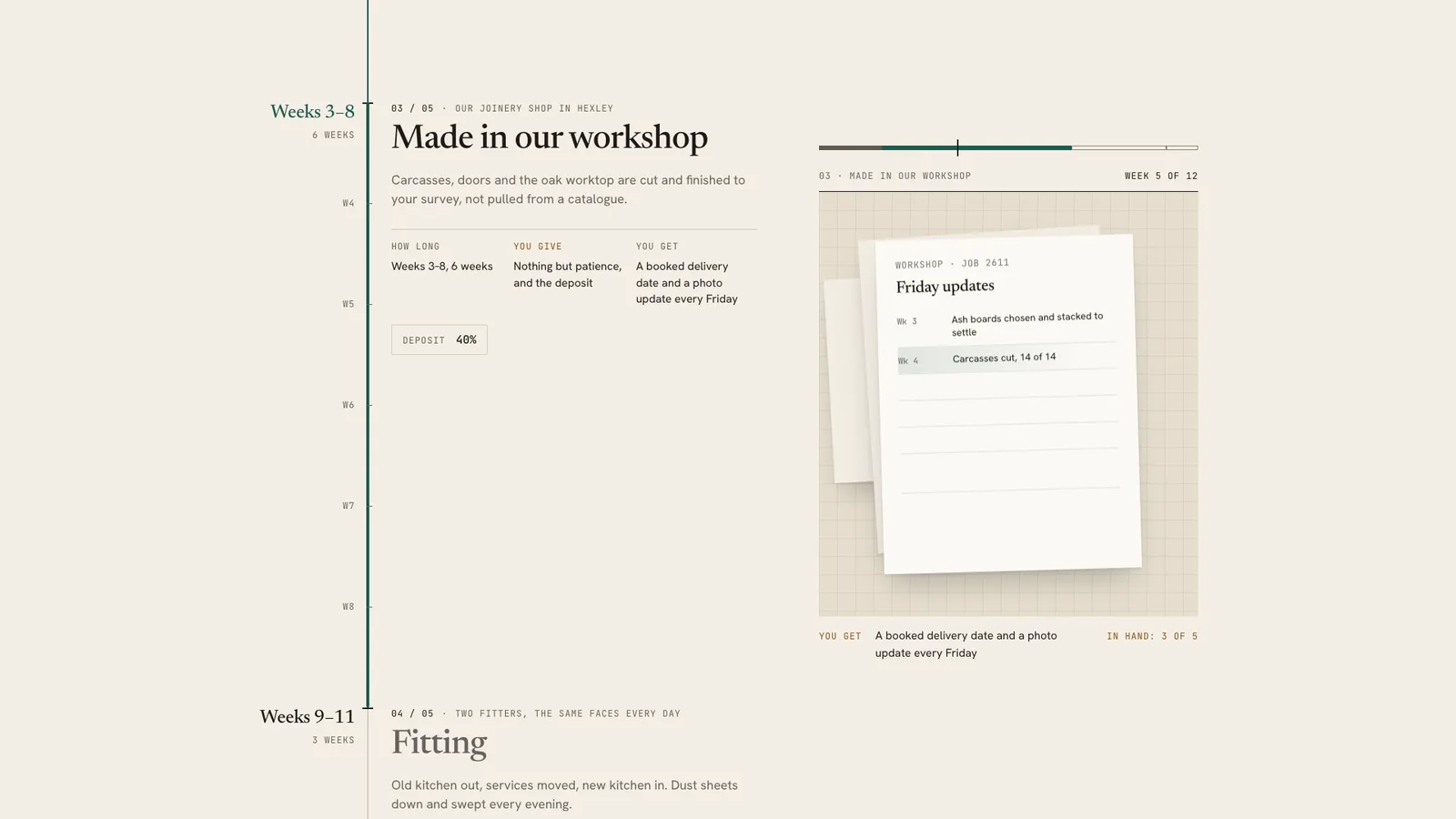
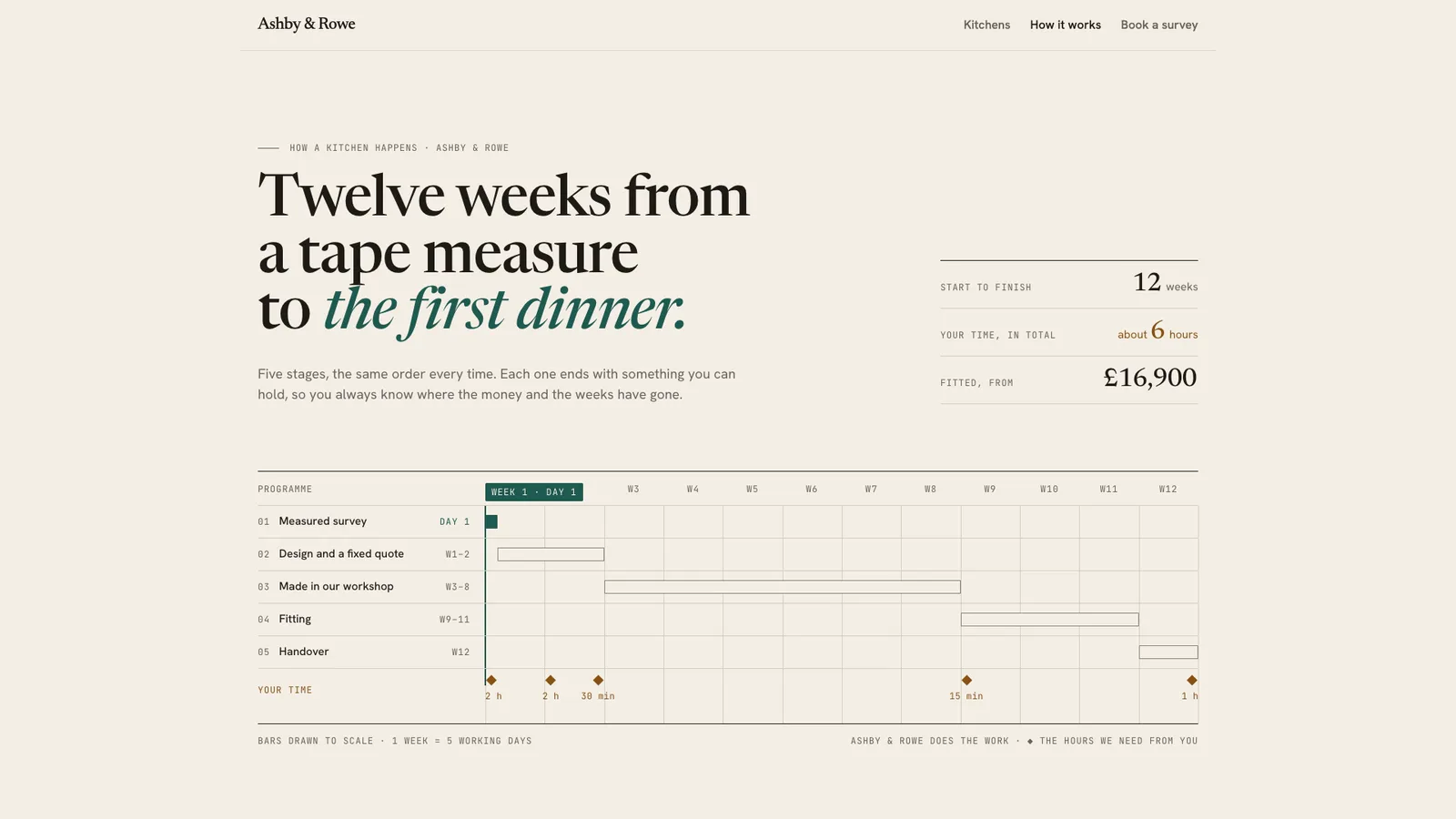
What you need
- Node.js 18 or newer. Nothing to install.
- Chrome, Chromium or Edge, for the check and the video (the scripts find it; set
CHROME_PATHif they don't). - ffmpeg for the video only (
brew install ffmpeg,winget install ffmpeg,apt install ffmpeg; or setFFMPEG_PATH). - Internet access when the page is opened, for the Google Fonts. Without them, system fonts stand in.
Last checked Nov 8, 2026: the package’s own build and render commands ran and passed.
If something goes wrong
The build lists problems and writes nothing.
Fix them all and build again; it reports everything at once.
"a 2-day gap before steps[2]".
The schedule must add up. Add the waiting as its own step (with what the buyer gets while they wait), or move the start.
"overlaps by 2 days".
If the two really run together, add
"parallel": trueto the later one; otherwise move its start.
What’s in the download
- SKILL.md16.4 KB
- examples/
- examples/ashby/6.13 KB1 file
- examples/northfold/5.25 KB1 file
- kit/
- kit/process.css19.0 KBthe whole design, scoped to
.ps: the intro, the programme, the rail, the desk, the nine kinds of deliverable, the tablet and phone rules and the reduced-motion rule. - kit/runtime.js13.0 KBthe browser runtime, inlined into every build. The project day under the reading line, the cursor and its flag, the rail's proportional heights and week ticks, the hour labels' placement, the desk and its pile, the logs, and the recording clock (
?ps-record=1). - scripts/
- scripts/kit/
- scripts/kit/artifacts.mjs6.74 KBdraws each kind of deliverable.
- scripts/kit/build.mjs11.7 KB
- scripts/kit/cdp.mjs4.93 KB
- scripts/kit/check.mjs16.8 KB
- scripts/kit/record.mjs6.19 KB
- scripts/kit/schema.mjs19.7 KBevery field, its limits, the colour rules and the arithmetic; lists every problem at once.
- scripts/kit/serve.mjs2.50 KB
- scripts/build.mjs144 Bprocess.json to
out/index.html(a short demo page around the section) andout/process-embed.html(the section to paste in). - scripts/check.mjs144 Bserves the page and checks it at 390, 768, 1024 and 1440 px, with reduced motion at 390 and 1440, and with JavaScript off at 390 and 1440.
- scripts/chrome.mjs3.63 KB
- scripts/record.mjs146 Bthe preview video, stills and
--moments. - scripts/serve.mjs144 Bserves
out/on localhost to look at. - NOTICE.md1.41 KB
- TESTED.json548 B
19 files · 134 KB · installs to ~/.claude/skills/process-steps-kit for Claude Code and ~/.agents/skills/process-steps-kit for other agents
Credits and licenses: NOTICE.md plus any LICENSE files inside the ZIP.
Similar Skills
View allDetails
- Output
- page kit · 3 to 7 steps drawn to scale · page + embed · 1080p video
- Needs
- Node.js 18+, Chrome (or Chromium/Edge), and ffmpeg for the video
- Series
- Page Kits · 29 skills
- Updated
- Nov 8, 2026
- Checked
- Nov 8, 2026: its own commands ran and passed. That is a working check, not a security audit.
Written for
See all 31 agents that read skill folders.
Install guides
For your agent
Generates with
Installed it? Tell others how it went. Reviews come from people who installed this skill.
Write a reviewFAQ
Why do some steps take longer to scroll past than others?
On two columns each step is a fixed floor plus up to 9 px per working day, so a six-week build takes visibly longer than a one-day survey. Week ticks sit exactly where the reading line will meet each week, and the check measures every step against that rule.
How is the buyer's total time worked out?
The build adds every touchpoint's minutes and rounds to the nearest whole hour, halves up, with about in front unless it is exact. Ashby adds up to 345 minutes, about 6 hours. If you state a figure that does not match, the build refuses it.
What happens if my steps overlap or leave a gap?
The build lists the gap or overlap with its days and writes nothing. Close the gap, add the waiting as its own step, or mark a step parallel if it really runs alongside. The steps that are not parallel must add up to the calendar total.
Which agents is How It Works written for?
Any agent that reads SKILL.md folders, including Claude Code, Codex, Cursor, GitHub Copilot, Gemini CLI and OpenCode.
Do I own what I make with it?
Yes. Everything your agent makes with this skill is yours, including for client and commercial work.
What if it doesn’t work for me?
Email support@lookbk.dev within 7 days of buying and we’ll fix it or refund you.
Credits and licensesWritten by Lookbk
Lookbk wrote this package with its own runtime and no third-party code; the built pages load Newsreader, Hanken Grotesk, JetBrains Mono, Bricolage Grotesque, Geist, Geist Mono and Archivo from Google Fonts under the SIL Open Font License 1.1. Written by Lookbk, no third-party code.
Credits and licenses for the open-source software and fonts it uses are in NOTICE.md inside the download.