The page this skill built from examples/fellbrook, working in your browser. Opens in a new tab. Also: .
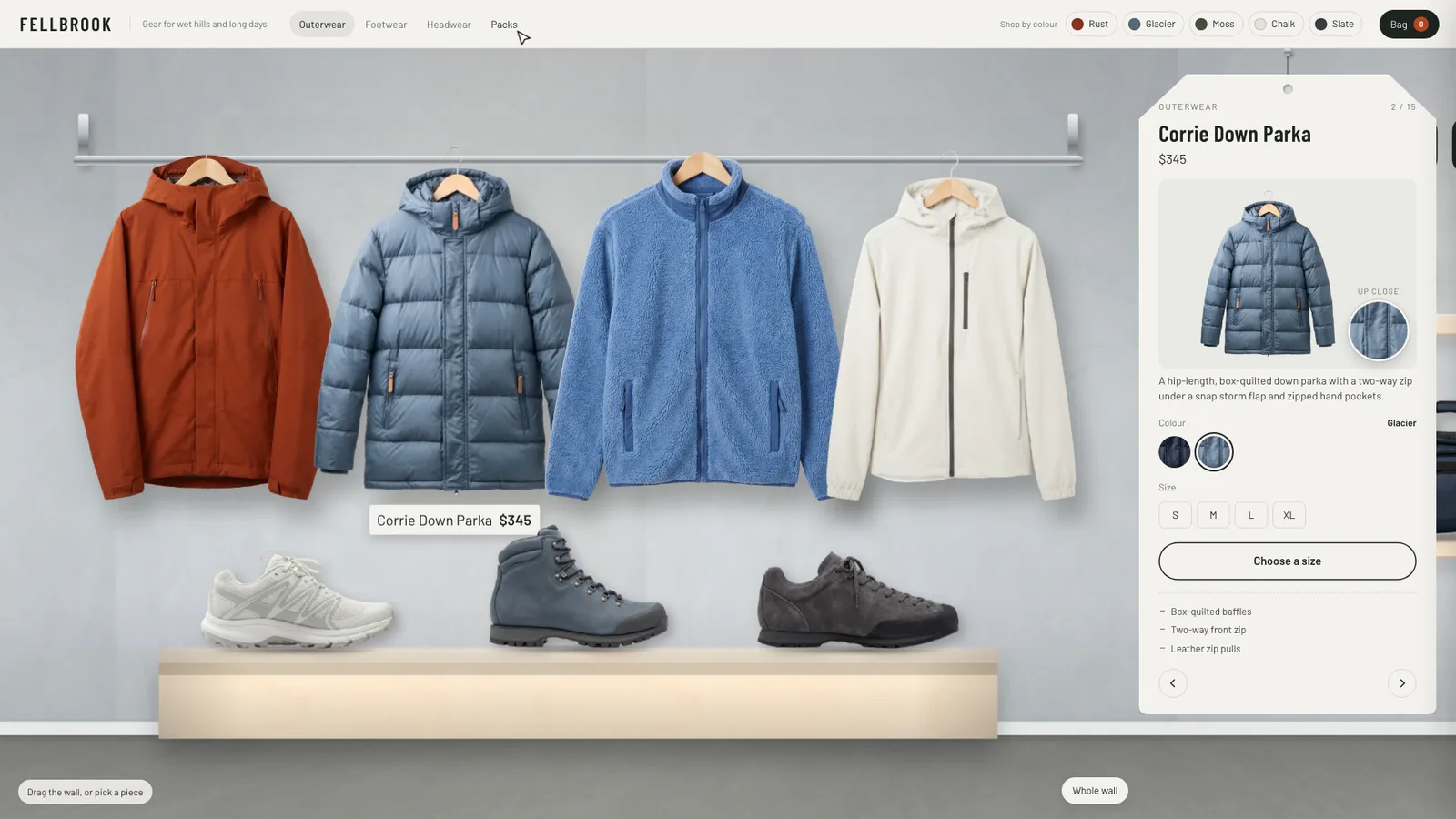
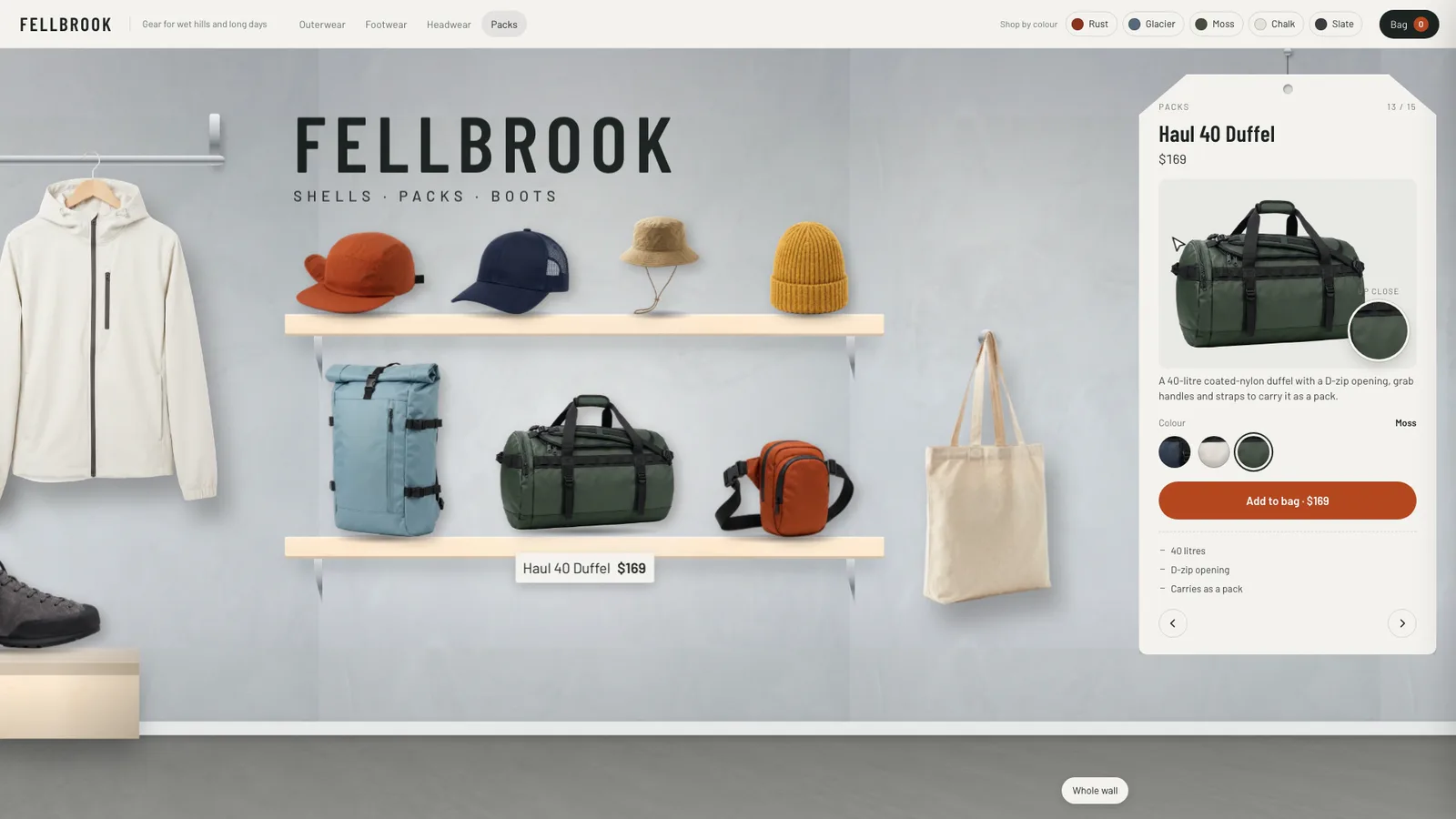
22-second example rendered by this skill from examples/fellbrook · 1280×720
What you get
- A self-contained shop-wall page built from one showroom.json, with your pictures beside it
- Rails, shelves, plinths, pegs and a painted sign, lit and shadowed, laid out and checked for overlaps by the build
- Colourways that spread from the fabric like dye, with garments swinging on their hooks
- A swing tag with price, sizes, fabric swatches from each photo, an up-close loupe and Add to bag
- Shop by colour across the whole wall, a draggable camera, links to every piece in a colour and a bag with a subtotal
- A script that cuts out and trims your product photos, and a recorder that films a demo of the finished page
- 2 examples: a cool outdoor wall with a steel rail and a warm city shop with a brass rail
- Open-source licenses for every part it builds on
Good fit
- A clothing or outdoor brand that makes each piece in several colours and wants shoppers to see them on a real-looking shop wall.
- A merch or capsule-collection drop that wants one page showing every piece, with shop by colour across the range.
- A maker of bags, hats or shoes who wants each colourway swatch to show the real material, not a flat dot.
Not for
- Recolouring a picture: every colourway is a photo you supply or generate
- A finished checkout: the bag links to your shop, it does not take payment
- 3D product spins: pieces are flat cut-outs seen from the front
About this skill
A product page built as one wall of a real shop: jackets hang from a steel or brass rail, caps and bags sit on wooden shelves, shoes stand on a plinth, the brand name is painted on the plaster and each fixture has its own pool of light. Click a piece and the camera glides along the wall to it while a paper swing tag shows its name, price, sizes, an up-close loupe of the fabric and swatches cut from its own photo. Pick a colour and it spreads out from the fabric like dye as the garment swings on its hook. Shop by colour re-dyes every piece that comes in that colour along the wall, fades the rest and pulls back to show the whole wall. The wall drags like walking past it, every piece in a colour has its own link, and the bag keeps colour and size. Your agent cuts out your product photos, lays the pieces out in one showroom.json, builds a single page and can film a demo of it.
Example request
Build a shop-wall page for our range: jackets on a rail, caps and bags on shelves, shoes on a plinth, every colourway swappable, with our prices and colours.
How it works
Your agent
- 1
Collect the pieces and the colours
Ask for, or take from the brand's site.
- 2
Cut out the photos
Each photo is cut out (rembg), stray bits such as a softbox corner or a light flare are dropped, and the piece is trimmed with a small margin, so the top of a garment picture is its hanger hook and the bottom of a shoe picture is its sole.
- 3
Write showroom.json and lay out the wall
Copy
examples/fellbrook/showroom.json(cool plaster, steel rail, dollars) orexamples/sunday/showroom.json(warm plaster, brass rail, euros) and replace everything. - 4
Build
The build checks every field and length, every colour reference, that every picture exists and every cut-out is transparent, that each piece is on exactly one fixture, and the layout: nothing off the wall or below the floor, pieces on a shelf or plinth not touching, garments on a rail overlapping no more than 30 %, and no piece running into another fixture or its pieces.
- 5
Check it, and film it
The recorder plans its tour from your page: a piece and its second colour, a piece far along the wall with three colours, two colour chips and back, a size, Add to bag, the bag.
- 1
You get
- out/index.html
What you need
- Node.js 18 or newer, for the build. Nothing to install.
- A photo of every piece in every colourway, on a plain white or light grey background, the whole piece in frame. Garments front-on on a hanger with the hook showing (the hook is what hangs on the rail); caps, bags and shoes three-quarter view. Colourways of one piece should share the camera, so they swap in place: an image model makes them by editing the first photo and changing only the colour (the prompts that made the examples are in
examples/PROMPTS.md). Studio photos work too. - Three seamless textures: wall (plaster, paint, tile), wood for shelves and plinths, floor. 1024 px square is plenty.
- Python 3.10 to 3.13 with
pip install "rembg[cpu]" pillow numpy opencv-python-headless, forscripts/prepare.py, which cuts the photos out. If your pictures are already transparent PNGs or WebPs, run it anyway for the trim and swatch points, or skip it and giveswatchyourself. - Chrome or any other browser to look at the result.
- Only for the demo film:
npm i playwright(thennpx playwright install chromium) and FFmpeg. - Internet when the page is opened, for the Google Fonts. Without it, system fonts stand in.
Last checked Nov 24, 2026: the package’s own build and render commands ran and passed.
If something goes wrong
A piece jumps or changes size when its colour changes
Its colourway photos were framed differently. Make every colourway an edit of the first photo that changes only the colour, then run
prepare.pyagain.A pale piece has holes, or background is left between straps
Run that photo through
prepare.py --model birefnet-general.The build says two pieces overlap
Widen the fixture, lower
itemHeightor that piece'sh, or place it withat. On a rail some overlap is allowed; on shelves none is.
What’s in the download
- SKILL.md13.1 KBthese instructions.
- examples/
- examples/fellbrook/13.9 KBtwo showrooms with their
showroom.jsonandassets/. The brands, pieces, prices and copy are made up; the product photos and textures were generated. · 2 files - examples/sunday/13.9 KB2 files
- examples/PROMPTS.md11.9 KBthe image prompts behind the example photos and textures.
- scripts/
- scripts/build.mjs16.8 KBchecks showroom.json, lays out the wall and writes the page;
scripts/image-info.mjsreads picture sizes and transparency. - scripts/image-info.mjs1.34 KB
- scripts/prepare.py6.79 KBcuts out product photos, trims them, finds the swatch point and average colour; squares textures with
--tile. - scripts/record.mjs10.6 KBfilms the built page with a planned tour, or takes one still.
- template/
- template/showroom.html37.2 KBthe page (wall, lighting, fixtures, camera and dragging, the dye and swing, the swing tag, shop by colour, bag, links, keyboard), filled in by the build.
- NOTICE.md1.39 KB
- TESTED.json1.04 KB
13 files · 128 KB · installs to ~/.claude/skills/colorway-showroom for Claude Code and ~/.agents/skills/colorway-showroom for other agents
Credits and licenses: NOTICE.md plus any LICENSE files inside the ZIP.
Similar Skills
View allDetails
- Output
- Shop-wall product page · colourways that dye in place · shop by colour, swing tag, bag · page from showroom.json
- Needs
- Node.js 18+ and a browser; Python 3 with rembg and OpenCV to cut out product photos; Playwright and FFmpeg only for the demo film
- Series
- Page Kits · 35 skills
- Updated
- Nov 24, 2026
- Checked
- Nov 24, 2026: its own commands ran and passed. That is a working check, not a security audit.
Written for
See all 31 agents that read skill folders.
Install guides
For your agent
Generates with
Installed it? Tell others how it went. Reviews come from people who installed this skill.
Write a reviewFAQ
How does a colour change without a cross-fade?
Every colourway is its own photo, cut out and trimmed the same way, so the new one is laid over the old and revealed in a circle that grows from the middle of the fabric.
Where do the colourway photos come from?
From you: studio photos of each colour, or an image model making the first one and then edits of it that change only the colour. The included script cuts them out and finds the swatch point.
Is the bag a real shop?
The bag keeps each piece with its colour and size and adds up your prices, but nothing is saved or charged. Its checkout button links to your own shop.
Which agents is Colorway Showroom written for?
Any agent that reads SKILL.md folders, including Claude Code, Codex, Cursor, GitHub Copilot, Gemini CLI and OpenCode.
Do I own what I make with it?
Yes. Everything your agent makes with this skill is yours, including for client and commercial work.
What if it doesn’t work for me?
Email support@lookbk.dev within 7 days of buying and we’ll fix it or refund you.
Credits and licensesWritten by Lookbk
Lookbk wrote this package: the shop-wall page, its dye and swing, the build and layout checks, the cut-out script and the demo recorder. The example product photos and textures were generated with Gemini for Lookbk; no third-party code ships in the page. Written by Lookbk, no third-party code.
Credits and licenses for the open-source software and fonts it uses are in NOTICE.md inside the download.