The page this skill built from examples/coldframe, working in your browser. Opens in a new tab. Also: .
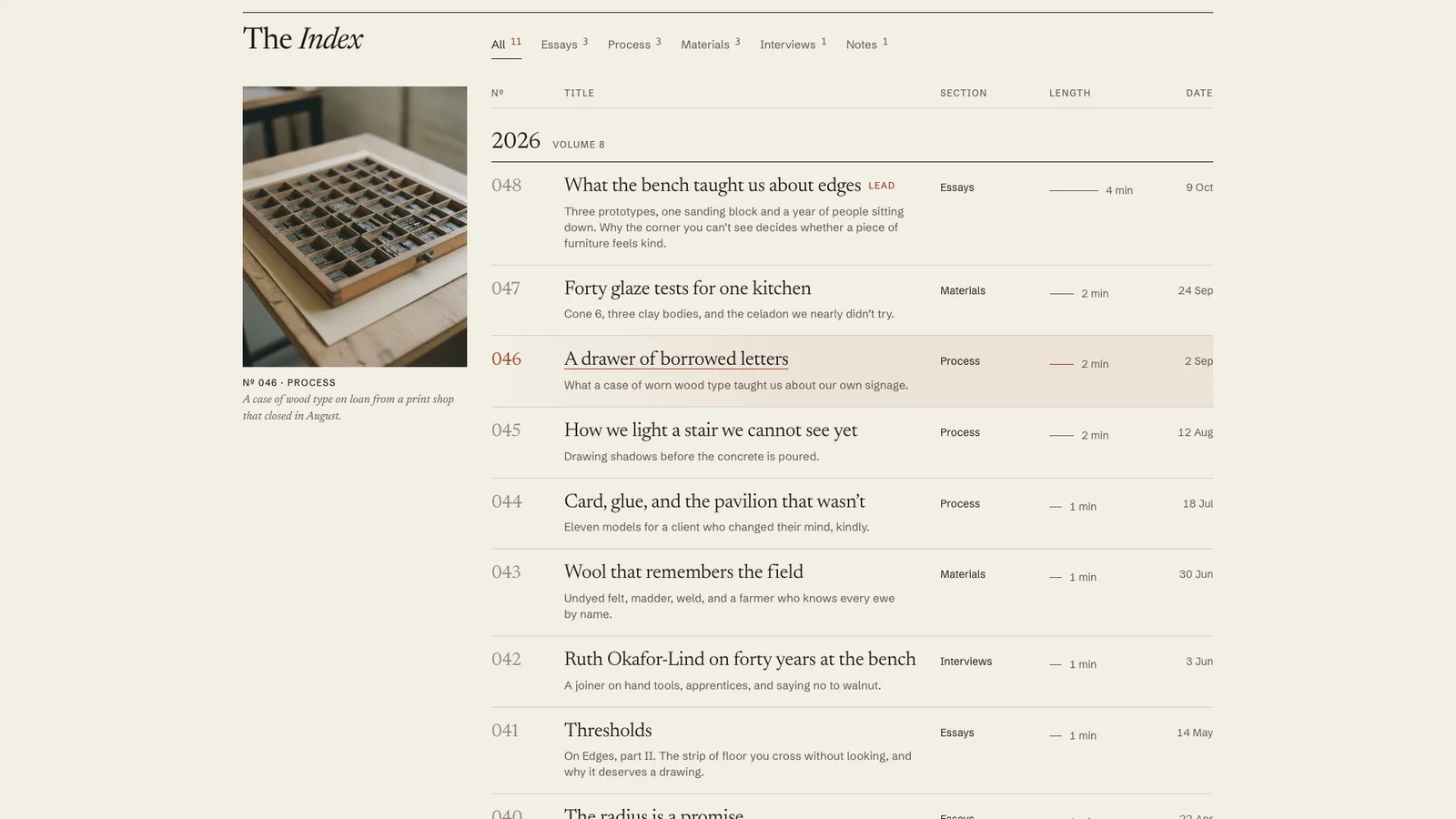
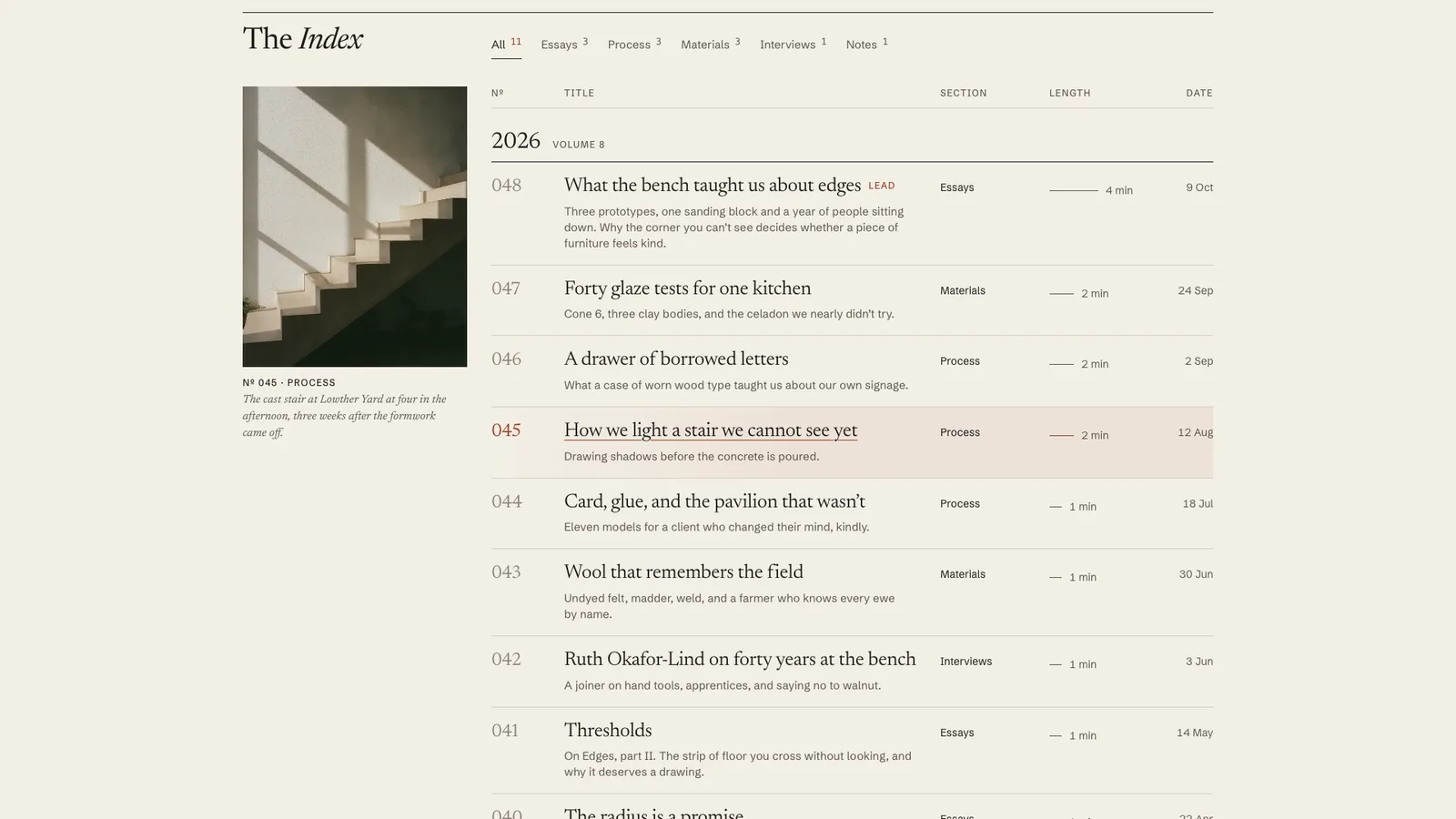
10-second example rendered by this skill from examples/coldframe · 1280×720
What you get
- A front page with a masthead, lead story, numbered register, section filters and a series band
- A preview slot that follows the pointer and the keyboard, with typographic and chart plates when there is no photo
- Article pages with sidenotes, pull quotes, numbered figures, charts, highlighted code and a contents rail
- Section pages and an archive page that work without JavaScript
- RSS 2.0 with full text, a sitemap and Article JSON-LD from the same front matter
- Two presets, paper and ink, with contrast checked at build time and in the browser
- A paste-in embed and a 10-second 1080p preview recorder
- Open-source licenses for every part it builds on
Good fit
- A design or architecture studio that publishes essays and process notes and wants them to read like a magazine.
- An engineering team writing up incidents and systems work, with charts, code and footnotes in the posts.
- A brand moving off a blog theme that wants RSS, a sitemap and structured data without a content management system.
Not for
- Card grids of thumbnails with tag pills: the index is a register by design
- Sites that need comments, logins, search or a content management system
- Publishing hundreds of posts a day: the build writes static pages for a journal
- Sites whose posts live only in a database with no Markdown export
About this skill
A journal front page and article pages built from a folder of Markdown files, set like a printed magazine instead of a blog theme. The index is a numbered register: issue number, title and dek, section, reading time drawn as a hairline, and date, grouped by year. Section filters work in place and as real links. A preview slot beside the register shows the lead image of the row under the pointer or keyboard focus. Below sit a lead story and a series band. Articles get a drop cap, pull quotes, sidenotes in the margin, numbered figures that keep their shape, charts drawn from data, highlighted code, a contents rail and a progress bar. One reading-time model drives every minute shown. The build also writes RSS with full text, a sitemap and Article JSON-LD.
Example request
A design studio's journal front page on warm paper: a large serif masthead, a lead essay with a photograph and a big red issue number, then a typeset register of numbered pieces with a photo preview beside it.
How it works
Your agent
- 1
Collect the writing
Never invent pieces, dates, authors or numbers to fill the register.
- 2
Lay out the journal folder
The example photographs in
examples/coldframe/images/were generated for this demo. - 3
Write each post
- 4
Build
It lists every problem at once, with file and line: a missing dek, a section that isn't in
journal.json, two posts with the same number, a footnote used but never written, an image without alt text, an image or chart that isn't there, a series part claimed twice, a colour pair under its contrast minimum. - 5
Check
It runs the index and the lead article at 390, 768, 1024 and 1440 px, and with reduced motion at 390 and 1440, then every other page at 1440.
- 6
Look at it
Open the address it prints.
- 7
Publish
Upload the whole
out/folder to the address insite.url: every link, the feed and the canonical URLs assume it lives there. - 8
Record a preview (optional)
The video follows a fixed 10-second script: the masthead and lead, a scroll to the index, the register rising, the preview slot following three rows, one filter, a hold.
- 1
You get
- out/journal-embed.html
What you need
- Node.js 18 or newer. Nothing to install: the Markdown, front matter, code colouring and charts are all done by the kit's own scripts.
- Chrome, Chromium or Edge, for the check and the video (the scripts find it; set
CHROME_PATHif they don't). - ffmpeg for the preview video only (
brew install ffmpeg,winget install ffmpeg,apt install ffmpeg; or setFFMPEG_PATH). - Internet access when a page is opened, for its Google Fonts. Without them, system fonts stand in.
Last checked Nov 8, 2026: the package’s own build and render commands ran and passed.
If something goes wrong
The build says a footnote is used but never defined.
Every
[^id]in the text needs a line[^id]: textsomewhere in the post, and the ids must match exactly. Unused definitions are reported too.A section filter shows nothing.
The section is in
journal.jsonbut no published post uses it, so its page reads "Nothing in ... yet". Remove the section, or check the post'ssectionspelling and that its date isn't in the future.The minutes look too low or too high.
They come from the text, not from a field. Check
readinginjournal.json; long code listings count 5 seconds a line, and each figure adds 12 seconds.
What’s in the download
- SKILL.md20.3 KB
- examples/
- examples/coldframe/19.4 KBColdframe Journal, a furniture and interiors studio,
paper, 11 pieces, two series. · 13 files - examples/tarnline/21.5 KBTarnline Engineering, a database company,
ink, 10 pieces with charts and code, an archive page. · 18 files - kit/
- kit/journal.css32.4 KBthe whole design, scoped to
.ji: both presets, tablet and phone rules, reduced motion. - kit/runtime.js17.3 KBthe browser runtime inlined into every page: filters, the preview slot, the entrance, sidenote placement, the rail and progress, and the recording clock.
- scripts/
- scripts/kit/
- scripts/kit/build.mjs36.9 KBthe page templates, the feed, the sitemap and the JSON-LD.
- scripts/kit/cdp.mjs4.94 KB
- scripts/kit/chart.mjs6.27 KBcharts from a .json file (line, bars, columns), drawn at any size with real text labels.
- scripts/kit/check.mjs27.5 KB
- scripts/kit/highlight.mjs4.33 KBbuild-time code colouring for Rust, Go, JavaScript, TypeScript, Python, SQL and shell.
- scripts/kit/images.mjs1.71 KBreads each picture's size, so every image has its width and height and nothing shifts while loading.
- scripts/kit/markdown.mjs10.7 KBfront matter and Markdown, including footnotes, pull quotes, figures and code fences, with line numbers in every error.
- scripts/kit/reading.mjs1.45 KBthe reading-time model; the only place minutes are worked out.
- scripts/kit/record.mjs8.14 KB
- scripts/kit/schema.mjs10.5 KBevery field of
journal.jsonand of a post, its limits, the presets and the colour contrast rules. - scripts/kit/serve.mjs2.62 KB
- scripts/build.mjs145 Bthe journal folder in, the whole site out (index, articles, section pages, archive, feed, sitemap, embed, images).
- scripts/check.mjs145 Bchecks a built journal at 390, 768, 1024 and 1440 px, with reduced motion, without JavaScript, and its feed, sitemap and JSON-LD.
- scripts/chrome.mjs1.06 KB
- scripts/record.mjs147 Bthe preview video, stills of any page, and
--moments. - scripts/serve.mjs145 Bserves the built site on localhost to look at.
- NOTICE.md1.65 KB
- TESTED.json497 B
52 files · 230 KB · installs to ~/.claude/skills/journal-index-kit for Claude Code and ~/.agents/skills/journal-index-kit for other agents
Credits and licenses: NOTICE.md plus any LICENSE files inside the ZIP.
Similar Skills
View allDetails
- Output
- page kit · Markdown folder to journal index and articles · RSS, sitemap, JSON-LD · 1080p video
- Needs
- Node.js 18+, Chrome (or Chromium/Edge), and ffmpeg for the video
- Series
- Page Kits · 29 skills
- Updated
- Nov 8, 2026
- Checked
- Nov 8, 2026: its own commands ran and passed. That is a working check, not a security audit.
Written for
See all 31 agents that read skill folders.
Install guides
For your agent
Generates with
Installed it? Tell others how it went. Reviews come from people who installed this skill.
Write a reviewFAQ
How is the reading time worked out?
Prose is read at 230 words a minute, code at 12 lines a minute, and each figure adds 12 seconds. The total is rounded up, and the index, the article, JSON-LD and the minutes-left counter all use that one number.
What happens to footnotes on a phone?
On screens 1180 px and wider they sit in the margin beside the line that references them, pushed down so none overlap. Narrower screens, and pages without JavaScript, show them as numbered notes at the end with links back to the text.
Can the preview beside the index show a chart instead of a photo?
Yes. A post whose lead is a chart file gets that chart in the preview slot, redrawn at the slot's size with its labels kept at 12 px. A post with neither shows its issue number and section as a typographic plate.
Which agents is Journal Index written for?
Any agent that reads SKILL.md folders, including Claude Code, Codex, Cursor, GitHub Copilot, Gemini CLI and OpenCode.
Do I own what I make with it?
Yes. Everything your agent makes with this skill is yours, including for client and commercial work.
What if it doesn’t work for me?
Email support@lookbk.dev within 7 days of buying and we’ll fix it or refund you.
Credits and licensesWritten by Lookbk
Lookbk wrote this package with its own Markdown, front matter, code colouring and chart code and no third-party libraries; the built pages load Newsreader, Schibsted Grotesk, Geist, Geist Mono and Source Serif 4 from Google Fonts under the SIL Open Font License 1.1, and the example photographs are AI-generated. Written by Lookbk, no third-party code.
Credits and licenses for the open-source software and fonts it uses are in NOTICE.md inside the download.