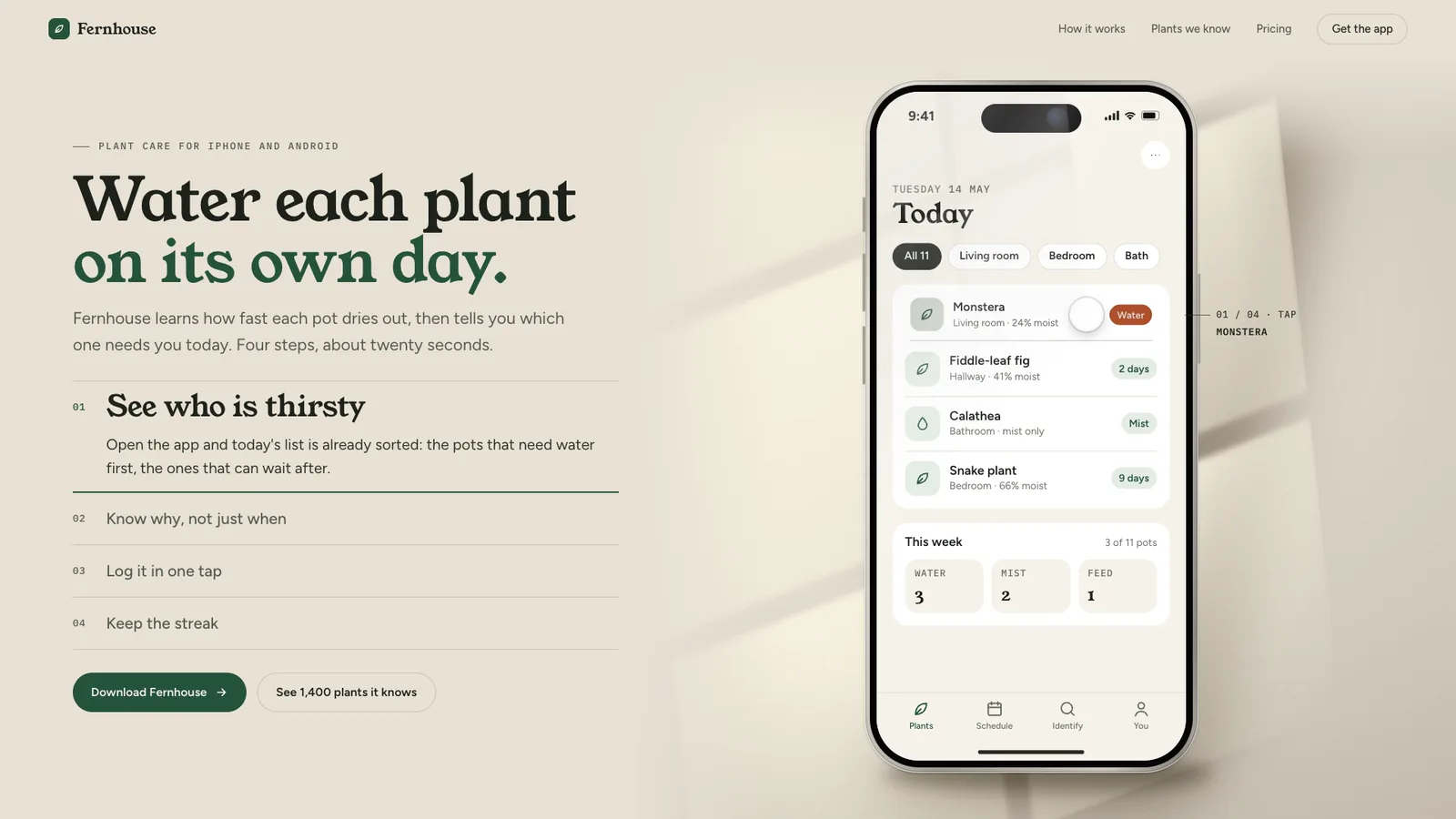
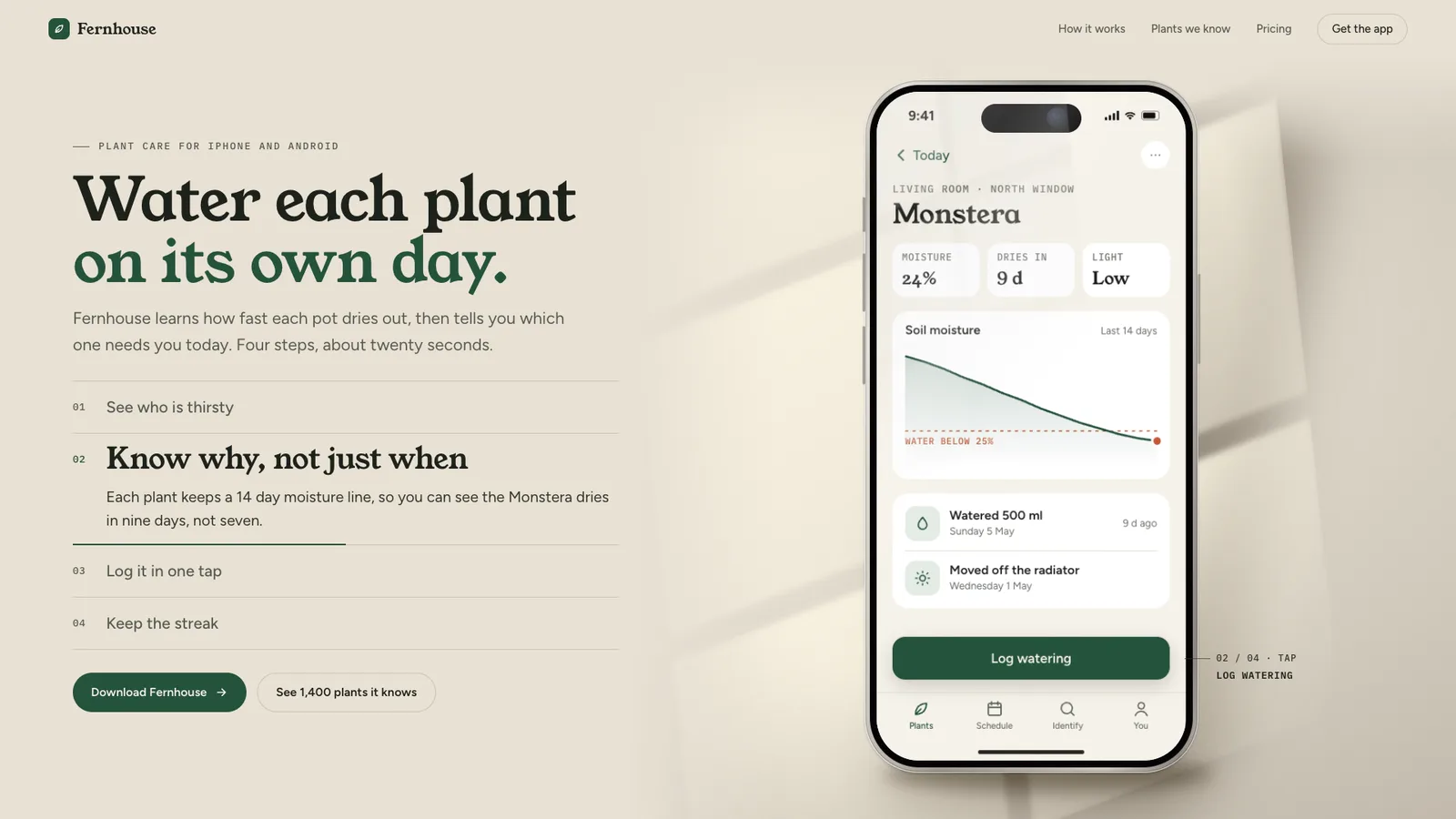
The page this skill built from examples/fernhouse, working in your browser. Opens in a new tab. Also: .
21.2-second example rendered by this skill from examples/fernhouse · 1280×720
Example settingswhat each example above was built from
examples/fernhousepage.json
- Brand
- Fernhouse
- Headline
- Water each plant _on its own day._
- Colors
- bg #e8e1d4 · ink #1d221b · ink2 #2f352c · muted #555b51 · line #1d221b29 · accent #23533b · accentInk #23533b · onAccent #f6f1e7 · shadow #342816
examples/latecomerpage.json
- Brand
- Latecomer
- Headline
- Lights down in _three taps._
- Colors
- bg #0d0c10 · ink #f3ede3 · ink2 #d9d2c6 · muted #a39d93 · line #f3ede329 · accent #f2b33d · accentInk #f2b33d · onAccent #17120a · shadow #000000
What you get
- A self-contained index.html and a paste-in embed.html for your hero
- 3 to 5 steps, each caused by a visible tap and arriving as a push, sheet, tab or fade
- Numbered chapters with progress bars that follow the scroll both ways
- A phone layout with the phone and caption on the first screen, and a still stack for reduced motion
- A check at 390, 768, 1024 and 1440 wide for text size, contrast, layout shift and tap placement
- A frame-by-frame recorder for a 1920x1080 preview video and stills
- Two examples: a light plant care app and a dark cinema ticket app
- Open-source licenses for every part it builds on
Good fit
- An app with one clear task you can show in 3 to 5 screens, like booking, logging or paying.
- A launch page that needs to explain how the app works without a video or a long feature list.
- A brand with its own colours and fonts that should carry into both the page and the app screens.
Not for
- Showing three screens side by side at once
- Video recordings of a real app
- Long feature tours of more than 5 screens
- Desktop or web app screenshots
About this skill
A landing page hero built around one phone that walks through 3 to 5 screens of your app, one tap at a time. On each step a fingertip ring lands beside the thing to tap, never over its label, the button dips and darkens, and the next screen arrives the way the app itself moves: a push from the side, a sheet rising over the dimmed screen, or a tab change. The numbered chapters beside the phone open and fill a progress bar as the visitor scrolls, and scrolling back plays the story backwards. The phone is drawn in HTML and CSS and stands in one light from your product's world, a window on the wall or a projector beam with drifting dust. Screens come from your screenshots or a short JSON list of blocks.
Example request
Build an app landing page hero with one phone that walks through four screens of a plant care app, tap by tap, with a window light on the wall
How it works
Your agent
- 1
Find the story
Before any config: what single task should a visitor watch someone do in the app?
- 2
Write page.json
Copy
examples/fernhouse/page.json(light, window light, 4 steps) orexamples/latecomer/page.json(dark, projector beam, 3 steps) and replace every value. - 3
Build
It lists every problem at once (lengths, colours, unknown blocks or icons, a
tapthat names no id on its screen, missing pictures) and writes nothing until they are fixed. - 4
Check
It opens the page at 390x844, 768x1024, 1024x768 and 1440x900, then at 1440x900 and 390x844 with reduced motion, walks every step and fails on: script errors; sideways scrolling or text off the screen or cut off; page text under 14 px (16 px on a phone), labels under 12 px; contrast under WCAG AA; any layout shift of the buttons, the chapters, the caption or the phone between steps (measured at rest and mid-change); a screen not fully there when its step rests; the ring touching any letter of what it taps, or the target not dipping; a composed screen more than 32% empty or running under its tabs; the phone running into the copy or below the first screen (and on desktop the buttons, on a phone the caption's title); scrolling down not reaching every step or scrolling back up not playing them backwards; a chapter bar that does not follow the scroll; controls without a focus ring; reduced motion that still moves, or (phone) does not show every step as a still stack.
- 5
Look at it
Scroll through it, scroll back up, click a chapter, narrow the window to a phone, and turn on reduced motion in your system settings once.
- 6
Record a video (optional)
Writes
out/preview.mp4(1920x1080, 30 fps, one whole story in timed play, which loops) andout/poster.png(step 1 with the fingertip down). - 7
Hand off
out/index.html(plusout/assets/for screenshots) is the whole section, ready to host.
- 1
You get
- out/preview.mp4
- out/poster.png
- out/index.html
- out/embed.html
What you need
- Node.js 18 or newer. Nothing to install.
- Chrome, Chromium or Edge for the check and the video (found automatically; set
CHROME_PATHotherwise). - ffmpeg, only for the video (
brew install ffmpeg,winget install ffmpeg,apt install ffmpeg; or setFFMPEG_PATH).
Last checked Nov 8, 2026: the package’s own build and render commands ran and passed.
If something goes wrong
"
tap: no block ... with id"Give the thing to tap an
id(a row's, a chip's or a button's ownid) and name it in the step'stap."the fingertip ring covers ..."
The target is all label (a long button text edge to edge). Shorten the label, or use
righton a button so there is a gap."the screen is N% empty"
Add a block (a
rowslist, atilescard, atextline) or dock the button.
What’s in the download
- SKILL.md16.8 KB
- examples/
- examples/fernhouse/6.55 KB1 file
- examples/latecomer/5.63 KB1 file
- scripts/
- scripts/kit/
- scripts/kit/build.mjs35.2 KBvalidation and the HTML for the page, the phone, the chapters and every screen block.
- scripts/kit/cdp.mjs4.90 KBshared helpers that drive Chrome and serve files.
- scripts/kit/check.mjs20.7 KBthe check and the recorder.
- scripts/kit/icons.mjs3.52 KBthe line icons.
- scripts/kit/page.css23.1 KBall the styles, scoped under
.pss, inlined into the built page. - scripts/kit/record.mjs7.91 KB
- scripts/kit/runtime.js27.7 KBthe story: tap placement, the push, sheet and tab changes, chapters, scroll and timed play, light and dust, the reduced-motion stack,
window.PSSfor the recorder. - scripts/kit/serve.mjs2.48 KB
- scripts/build.mjs149 Bentry point; reads page.json, lists every problem, writes
index.html,embed.htmlandassets/. - scripts/check.mjs149 Bentry point; the checks above at four sizes and with reduced motion.
- scripts/chrome.mjs3.63 KBshared helpers that drive Chrome and serve files.
- scripts/record.mjs151 Bentry point; the preview video, the poster and single stills.
- scripts/serve.mjs149 Bentry point; serves a built folder on localhost.
- NOTICE.md1.36 KBlicences.
- TESTED.json429 Bwhat was run.
18 files · 160 KB · installs to ~/.claude/skills/phone-screen-showcase for Claude Code and ~/.agents/skills/phone-screen-showcase for other agents
Credits and licenses: NOTICE.md plus any LICENSE files inside the ZIP.
Similar Skills
View allDetails
- Output
- One phone, 3 to 5 app screens, tap by tap, scroll or timed, HTML and CSS phone, light and dark examples
- Needs
- Node.js 18+, Chrome (or Chromium/Edge), and ffmpeg for the video
- Series
- Page Kits · 29 skills
- Updated
- Nov 8, 2026
- Checked
- Nov 8, 2026: its own commands ran and passed. That is a working check, not a security audit.
Written for
See all 31 agents that read skill folders.
Install guides
For your agent
Generates with
Installed it? Tell others how it went. Reviews come from people who installed this skill.
Write a reviewFAQ
Can I use my real app screenshots instead of composed screens?
Yes. Give a step an image next to page.json instead of blocks, plus where the tap lands in percent and a short name for it. Portrait screenshots at 9:19.5 work best, kept under 600 KB each.
Does it work when someone prefers reduced motion?
Yes. Nothing moves. On a laptop the chapters switch the screen at once when chosen, and on a phone every step is shown as a stack of still phones, each with its own caption.
Can it play on its own instead of following the scroll?
Set play to timed. Each step rests for stepSeconds, from 3 to 8, then the tap and the change play, and the story loops. It pauses on hover, on focus and when the section is off screen.
Which agents is Phone Screen Showcase written for?
Any agent that reads SKILL.md folders, including Claude Code, Codex, Cursor, GitHub Copilot, Gemini CLI and OpenCode.
Do I own what I make with it?
Yes. Everything your agent makes with this skill is yours, including for client and commercial work.
What if it doesn’t work for me?
Email support@lookbk.dev within 7 days of buying and we’ll fix it or refund you.
Credits and licensesWritten by Lookbk
Lookbk wrote this package, including its phone drawing, screen blocks, runtime and checks, with no third-party libraries; its example fonts load from Google Fonts under the SIL Open Font License 1.1. Written by Lookbk, no third-party code.
Credits and licenses for the open-source software and fonts it uses are in NOTICE.md inside the download.