The page this skill built from examples/perihelion, working in your browser. Opens in a new tab.
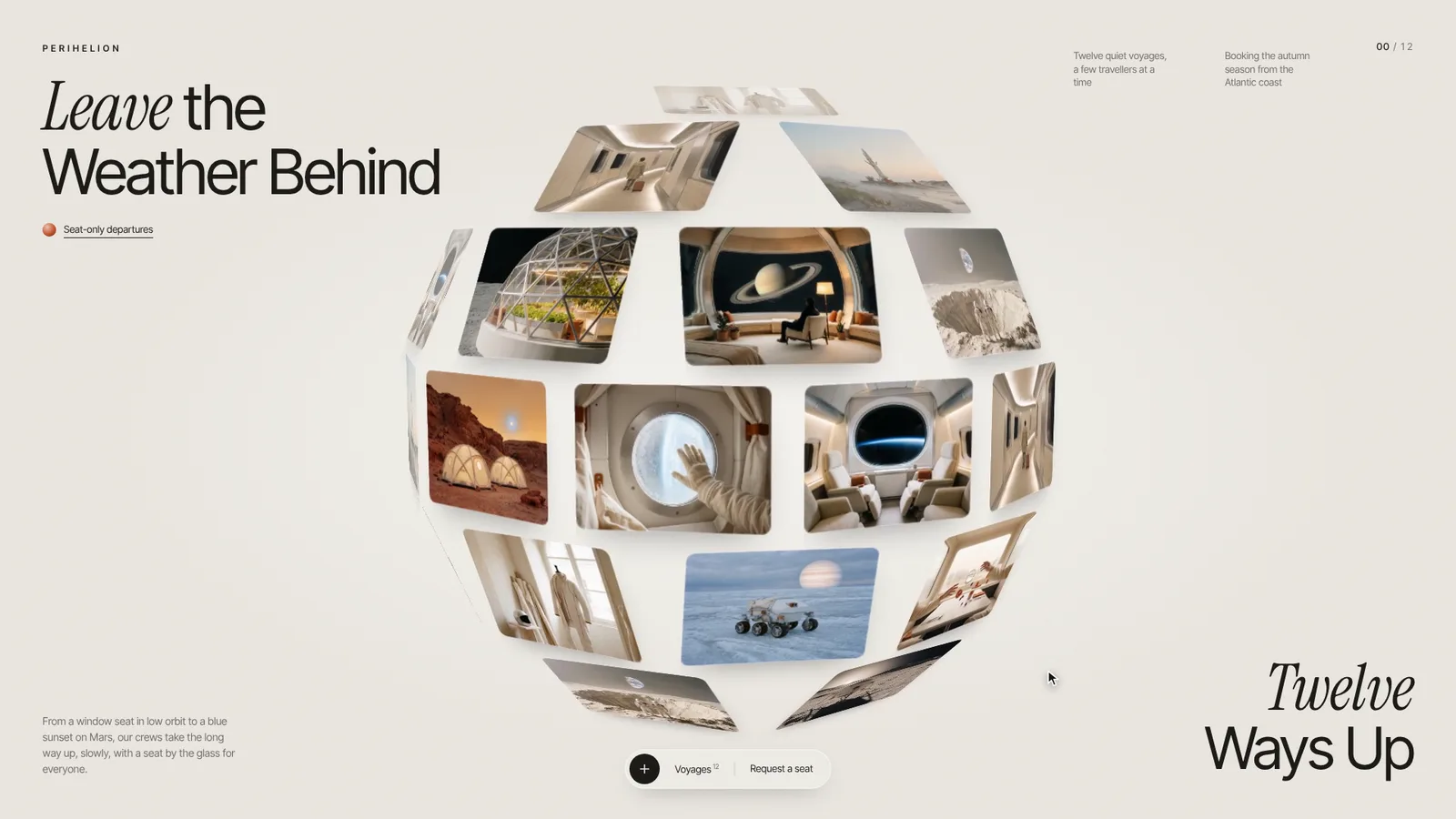
16-second example rendered by this skill from examples/perihelion · 1280×720
What you get
- A whole gallery site in one HTML file: the turning sphere, the corner texts, the pill with a list of every page
- Drag to spin with a throw that slows down, and a counter and title that follow the card under the pointer
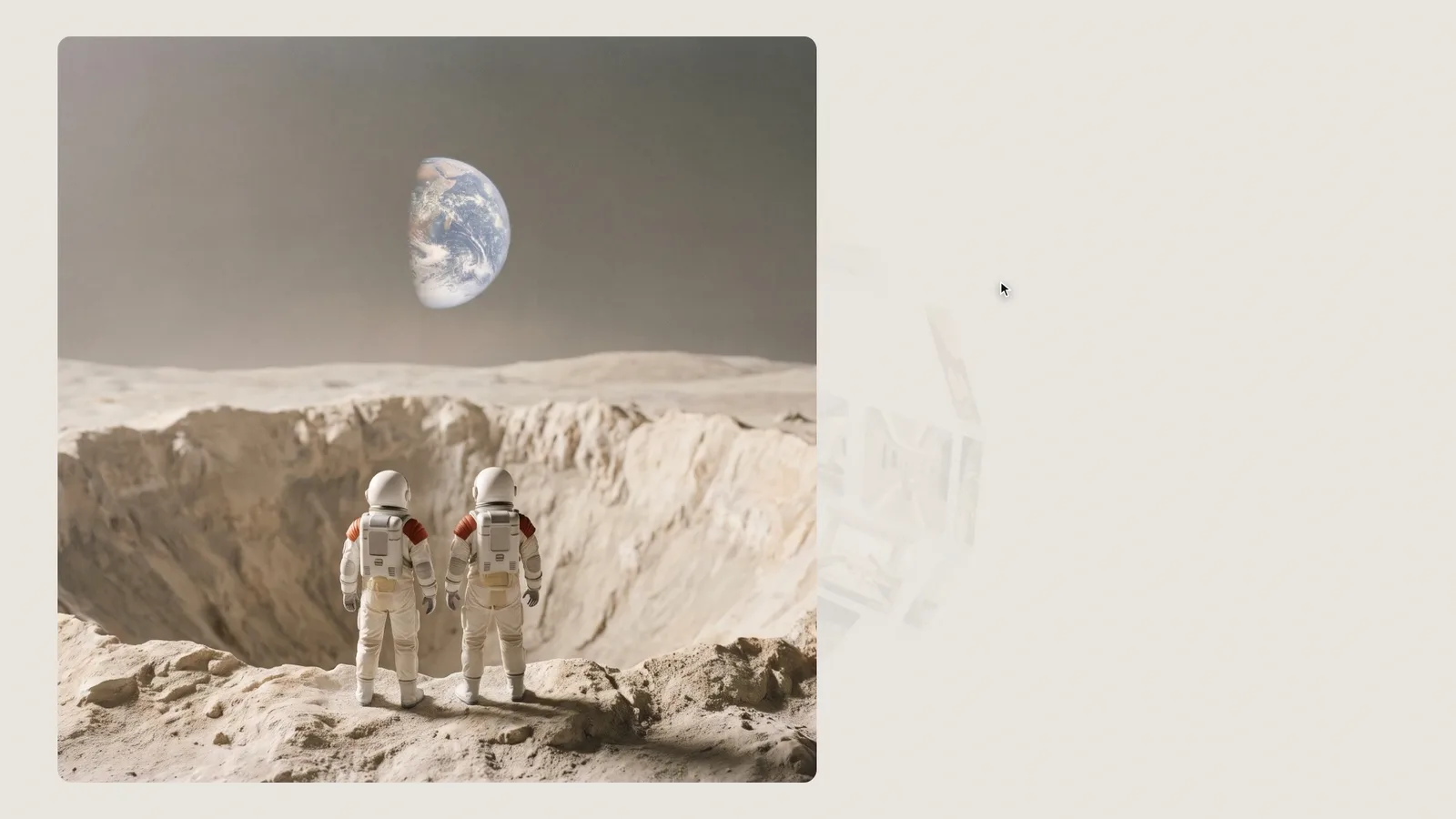
- A click turns the card to face you, then the picture flies into its own page and the words rise in
- Two page layouts (editorial split and full-bleed cover), next and previous, and a back flight into the sphere
- A link for every page (#/slug) that works with the browser’s back button, plus keyboard use and reduced motion
- Checks at 390, 768, 1280 and 1920 px that open every page, and a 1080p video of a scripted visit
- Open-source licenses for every part it builds on
Good fit
- Travel companies, hotels and destinations can put every trip, room or place on the sphere and give each one a page with its story, facts and a booking button.
- Photographers, architects and studios can show a body of work as one object to spin, then open each project full screen with an editorial or full-bleed cover layout.
- Brands with a matching set of pictures, from a fashion lookbook to a product collection, get a first screen people play with and a link to every page.
Not for
- Pictures you don’t have: bring one per page, or generate a matching set first (the example’s prompts show how)
- Long copy: every field has a length limit the build enforces
- A CMS, a shop with checkout or hundreds of pages (it is made for 6 to 24)
- Video on the cards
About this skill
A gallery website whose first screen is a slowly turning 3D sphere of picture cards. Drag it to spin it; click a card and the sphere turns it to face you, then the picture flies out and becomes the top of its own full page, with a title, a story, facts and a button, while the words rise in one after another. Previous and next turn the pages, and the back button flies the picture home to its card on the sphere. Around the sphere sit an italic serif and sans headline, two notes, a counter that follows the card under the pointer and a glass pill with a list of every page. Your agent writes one gallery.json with your words and pictures (6 to 24 pages), picks an editorial or full-bleed cover layout per page, and the build checks every length. Every page gets its own link, and a recorder makes a 1080p video of a visit. The example is a made-up space travel company with twelve generated pictures.
Example request
Make an Orbit Sphere Gallery for our boutique hotels: one page per hotel from our photo folder, cover layout for the sea views, and record the video for Instagram.
How it works
Your agent
- 1
Collect the pictures and the words
Every fact, price and claim must come from the person.
- 2
Write gallery.json
Copy
<skill>/examples/perihelion/gallery.json(Perihelion, quiet voyages to orbit and beyond) and replace every value. - 3
Build
It lists every problem at once (a missing field, words too long for their place, a picture it can't find, a bad link, low contrast) and writes nothing until they're fixed.
- 4
Check
At 390, 768, 1280 and 1920 px it fails on script errors, a picture that is missing from the sphere or doesn't load, sideways scrolling, corner texts that run into each other or off the screen, and links without an address; it opens every page, checks it has its picture (with alt text) and title and fits the width, and goes back to the sphere.
- 5
Look at it
Open the address it prints.
- 6
Record the video (optional)
Writes
out/preview.mp4(1920×1080, 30 fps, 16 seconds) andout/poster.png: the sphere turning, a cursor opening the firstdemopage, turning to the second, and going back. - 7
Put it online
out/is the whole site: upload the folder to any static host (Netlify, Cloudflare Pages, GitHub Pages, S3) or dropindex.htmlandimages/into an existing site's folder.
- 1
You get
- out/index.html
- out/preview.mp4
- out/poster.png
What you need
- Node.js 18 or newer. Nothing to install.
- Your pictures: one per page, landscape (4:3 is the design; 3:2 and 16:9 work), at least 1600 px wide, JPEG, PNG, WebP or AVIF. They should look like one set: the same light, palette and kind of subject. See "Pictures" below.
- ffmpeg, to make small copies of the pictures for the sphere (without it the sphere loads the full pictures) and for the video (
brew install ffmpeg,winget install ffmpeg,apt install ffmpeg, or setFFMPEG_PATH). - Chrome, Chromium or Edge for the checks and the video (the scripts find it; set
CHROME_PATHif they don't). - Internet access when the page is opened: the fonts load from Google Fonts. Without them system fonts stand in.
Last checked Nov 15, 2026: the package’s own build and render commands ran and passed.
If something goes wrong
The build says a field is too long
Shorten the words; the corners are sized for these lengths.
The check says corner texts overlap
The headline or the notes are too long for a 768 px screen; cut words.
The sphere looks patchy or repetitive
Fewer than 8 pictures repeat often on 40+ cards. Use 10 to 14.
What’s in the download
- SKILL.md12.9 KBthese instructions.
- examples/
- examples/perihelion/21.2 KBthe example, with its twelve pictures and the prompts they were made from. · 2 files
- scripts/
- scripts/build.mjs12.1 KBchecks
gallery.jsonand writes the site. - scripts/cdp.mjs4.93 KBa small DevTools-protocol client and the Chrome finder.
- scripts/check.mjs9.33 KBopens the site in headless Chrome at four widths and with reduced motion, and opens every page.
- scripts/chrome.mjs3.63 KB
- scripts/record.mjs5.56 KBsteps a scripted visit frame by frame into
preview.mp4andposter.png, or one still. - scripts/serve.mjs2.57 KBserves a built site on localhost.
- template/
- template/layouts/the page layouts,
editorialandcover. - template/layouts/cover.css2.70 KB
- template/layouts/cover.js1.21 KB
- template/layouts/editorial.css1.84 KB
- template/layouts/editorial.js1.06 KB
- template/page.html13.9 KBthe markup and CSS of the sphere screen, the top bar and the pill.
- template/runtime.js21.6 KBthe sphere, the drag, the tween clock, opening, paging and going back, deep links, and the recorder's hooks.
- NOTICE.md1009 B
- TESTED.json252 B
17 files · 116 KB · installs to ~/.claude/skills/orbit-sphere-gallery for Claude Code and ~/.agents/skills/orbit-sphere-gallery for other agents
Credits and licenses: NOTICE.md plus any LICENSE files inside the ZIP.
Similar Skills
View allDetails
- Output
- Gallery site · turning 3D sphere of picture cards · each card opens into its own page · 1080p video of a visit
- Needs
- Node.js 18+, your pictures (one per page), Chrome for the checks and the video, ffmpeg for small copies and the video
- Series
- Portfolios · 2 skills
- Updated
- Nov 15, 2026
- Checked
- Nov 15, 2026: its own commands ran and passed. That is a working check, not a security audit.
Written for
See all 31 agents that read skill folders.
Install guides
For your agent
Generates with
Installed it? Tell others how it went. Reviews come from people who installed this skill.
Write a reviewFAQ
What do I need to bring?
One picture per page, 6 to 24 of them, landscape and at least 1600 px wide, plus a title, a place, a summary sentence, up to four facts and up to three paragraphs for each. The pictures should look like one set; the example comes with the prompts its twelve generated pictures were made from, if you want to generate a set of your own.
How does a card turn into a page?
When you click a card the sphere turns it to face you, the page is laid out underneath, and the picture flies from the card to its place at the top of the page while the sphere shrinks away and the words rise in. The back button does the same in reverse, landing the picture on its card.
Can each page have its own design?
Yes. Each page picks a layout in gallery.json: editorial (picture on the left, words on the right) or cover (picture across the whole first screen with the title on it). A new layout is one small JavaScript file and one CSS file in the package, and the check opens every page in every layout.
Which agents is Orbit Sphere Gallery written for?
Any agent that reads SKILL.md folders, including Claude Code, Codex, Cursor, GitHub Copilot, Gemini CLI and OpenCode.
Do I own what I make with it?
Yes. Everything your agent makes with this skill is yours, including for client and commercial work.
What if it doesn’t work for me?
Email support@lookbk.dev within 7 days of buying and we’ll fix it or refund you.
Credits and licensesWritten by Lookbk
the page design, the sphere runtime, the layouts and the scripts, all written for Lookbk, and the example’s twelve pictures, generated for Lookbk from scenes written for it. The fonts are from Google Fonts. Written by Lookbk, no third-party code.
Credits and licenses for the open-source software and fonts it uses are in NOTICE.md inside the download.