The page this skill built from examples/fennick, working in your browser. Opens in a new tab. Also: .
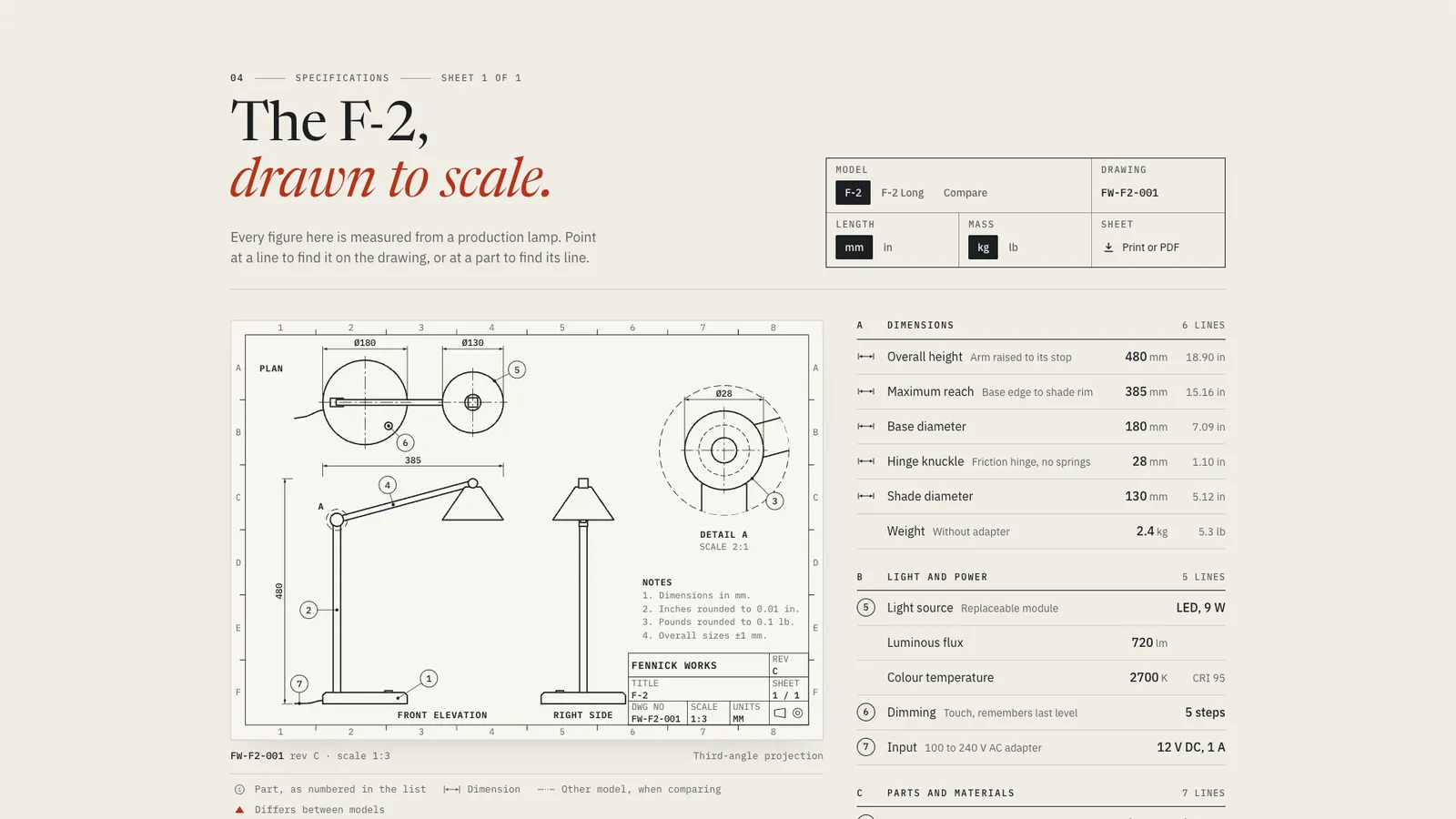
14.7-second example rendered by this skill from examples/fennick · 1280×720
What you get
- A self-contained section page and a paste-in embed
- An engineering drawing from config: views, detail, section, balloons, dimensions, notes and title block
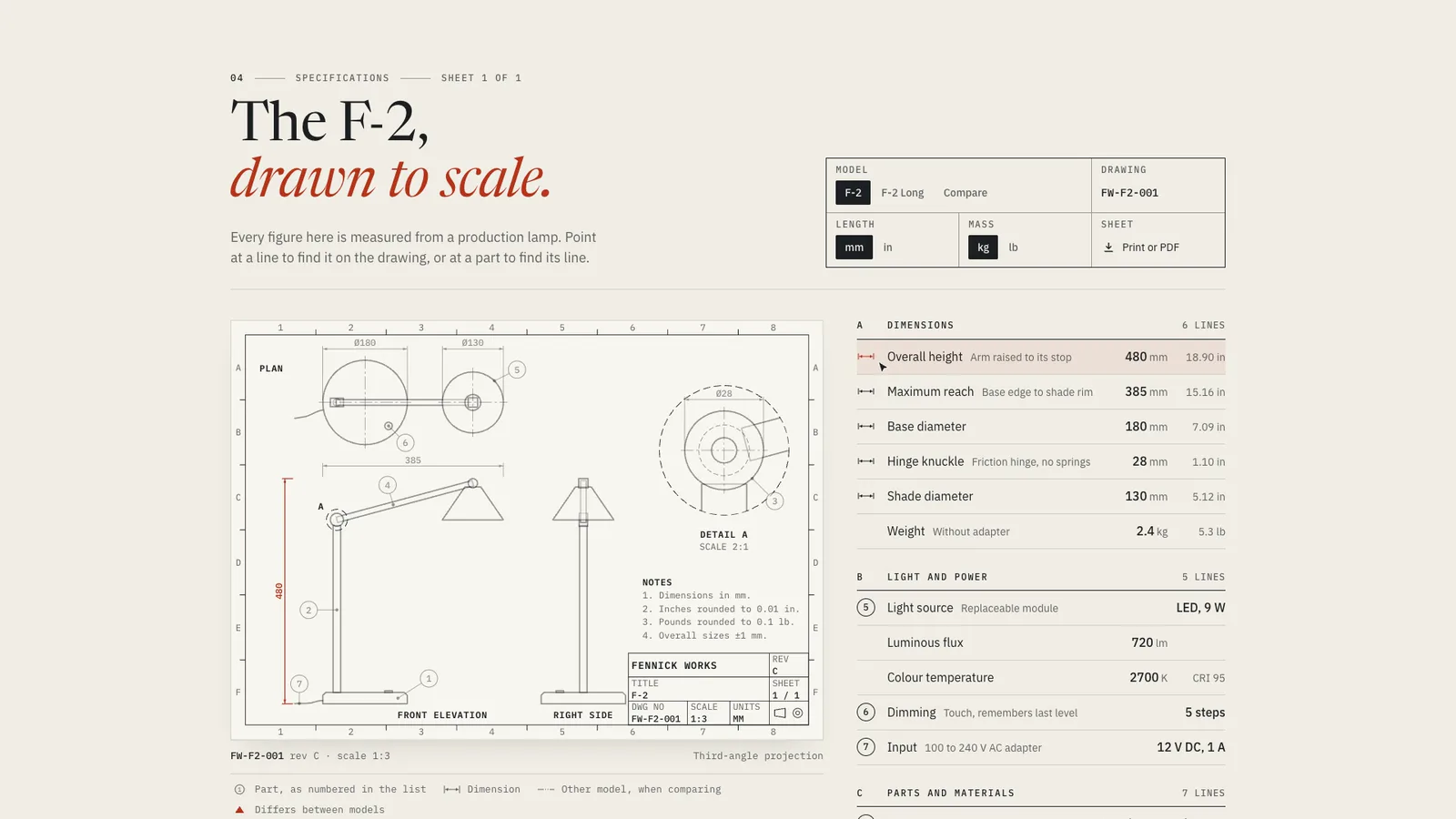
- A spec table linked to the drawing in both directions
- mm and inch, kg and pound switches that convert the table, the drawing and the notes
- Compare mode for up to 3 models with phantom lines and a tabulation block
- A one-page landscape print on A4 or Letter
- Build checks for dimensions, view consistency, cell fit and energy, plus checks at 4 widths
- Open-source licenses for every part it builds on
Good fit
- A hardware brand whose buyers compare sizes, weights and materials before they order.
- A product family sold in 2 or 3 sizes, where the difference in length or capacity should be visible at a glance.
- A maker who wants a printable one-page datasheet that matches the web page exactly.
Not for
- Software products with no physical dimensions
- Photorealistic product renders or 3D models
- Comparing more than 3 models at once
- Specs pulled live from a database: the table is built from spec.json
About this skill
The technical specifications section of a hardware product page, set as one engineering drawing and its schedule. The product is drawn in true orthographic views from one spec.json, with drafting line weights, dimension lines, numbered balloons, a detail view, a hatched section and a title block. Every balloon is a line number in the table, and pointing at a line lights its part or dimension on the drawing, and the reverse. Units switch between mm and inches and between kg and pounds, with the rounding printed in the drawing's notes. Compare mode sets up to 3 models side by side, writes shared values once and draws the other models as phantom lines. The build checks every drawn dimension against the table, and the sheet prints on one landscape page.
Example request
A product specifications section set as an engineering drawing: a desk lamp in plan, elevation and a 2:1 detail on drafting film, its numbered balloons matching the spec table beside it.
How it works
Your agent
- 1
Collect the facts
Use their real figures.
- 2
Draw the product
Copy the example closest to your product and edit it:
examples/fennick/spec.jsonfor an object with a detail view,examples/ampwright/spec.jsonfor a family of lengths with a section. - 3
Dimension it
Each dimension in
drawing.dimsnames theview, the lengthrowin the schedule it shows,kind(horv), the two pointsaandbin product mm, andoffset(how far from the object the dimension line sits, in sheet units, negative for above or left). - 4
Build
It lists every problem at once and writes nothing until they are fixed.
- 5
Check
Then it prints the page to PDF and fails unless the sheet is one page.
- 6
Look at it
Open the address it prints, on a laptop and on a phone.
- 7
Put it on the product page
Paste
out/spec-embed.htmlwhere the specifications section goes. - 8
Record a preview (optional)
The video follows
tour: the dimensions draw in, then each step points at a line, a part or a control and holds.
- 1
You get
- out/spec-embed.html
- out/index.html
What you need
- Node.js 18 or newer. Nothing to install.
- Chrome, Chromium or Edge, for the checks, the print check and the video (the scripts find it; set
CHROME_PATHif they don't). - ffmpeg for the video and the print picture only (
brew install ffmpeg,winget install ffmpeg,apt install ffmpeg; or setFFMPEG_PATH). - The product's real dimensions, in millimetres, and a rough sketch of its outline in each view (see step 2). Internet access when the page is opened, for the Google Fonts.
Last checked Nov 8, 2026: the package’s own build and render commands ran and passed.
If something goes wrong
Build says a dimension is drawn at one size and the table says another.
The drawing's points
aandband the table must agree withindrawing.tolerance. Fix whichever is wrong. Usually the shape was sketched by eye. Move its edge to the real figure, and moveaorbwith it.Build says the views disagree on a part.
The part is wider in one view than in another (a knuckle 28 mm across in the side view but 18 mm deep in the plan). Check which axis the build names and make both views agree. Remember each view's
axes.Build says a view runs outside the frame.
Move its
originor use a smallerscale. Models with longer geometry need the room too, because every model is checked.
What’s in the download
- SKILL.md19.3 KB
- examples/
- examples/ampwright/26.4 KB1 file
- examples/fennick/23.8 KB1 file
- kit/
- kit/core.js27.6 KBthe drawing, the schedule and the unit maths, used by the build in Node and by the page in the browser.
- kit/runtime.js18.6 KBthe browser runtime, inlined into every build. Redraws on model, unit and compare changes, links lines and parts both ways, runs the draw-in clock, the phone views and the recording tour.
- kit/spec.css18.1 KBthe whole design, scoped to
.ss: desktop, tablet, phone, reduced motion and print. - scripts/
- scripts/kit/
- scripts/kit/build.mjs8.75 KB
- scripts/kit/cdp.mjs4.93 KB
- scripts/kit/check.mjs18.4 KB
- scripts/kit/record.mjs9.00 KB
- scripts/kit/schema.mjs20.9 KBevery field and its limits, contrast, and the drawing checks (dimensions against the table, views against each other, frame, cells, products). Lists every problem at once.
- scripts/kit/serve.mjs2.50 KB
- scripts/build.mjs142 Bspec.json to
out/index.html(the section on its own page) andout/spec-embed.html(the section to paste in). - scripts/check.mjs142 Bchecks the built page at 390, 768, 1024 and 1440 px, with reduced motion, and prints it to PDF.
- scripts/chrome.mjs3.63 KB
- scripts/record.mjs144 Bthe preview video, stills from settled moments,
--moments, and--print(PDF and a picture of the printed sheet). - scripts/serve.mjs142 Bserves
out/on localhost to look at. - NOTICE.md1.32 KB
- TESTED.json613 B
19 files · 204 KB · installs to ~/.claude/skills/spec-sheet-kit for Claude Code and ~/.agents/skills/spec-sheet-kit for other agents
Credits and licenses: NOTICE.md plus any LICENSE files inside the ZIP.
Similar Skills
View allDetails
- Output
- page kit · drawing + spec table · page + embed · 1080p video
- Needs
- Node.js 18+, Chrome (or Chromium/Edge), and ffmpeg for the video
- Series
- Page Kits · 29 skills
- Updated
- Nov 8, 2026
- Checked
- Nov 8, 2026: its own commands ran and passed. That is a working check, not a security audit.
Written for
See all 31 agents that read skill folders.
Install guides
For your agent
Generates with
Installed it? Tell others how it went. Reviews come from people who installed this skill.
Write a reviewFAQ
How does the drawing stay true to the numbers?
The build measures every dimension on the drawing and compares it with the table's value for each model, within the tolerance you set. It also checks that each part is the same size in every view, and fails with the part, the axis and the sizes when they disagree.
What happens on a phone?
Under 740 px of sheet width the drawing shows one view at a time, pinned at the top while the table scrolls under it. Tapping a line jumps to the view that shows it, and compare mode puts each model's value in its own column under the label.
Can visitors print the specifications?
Print or PDF lays out one landscape A4 or Letter page: the drawing at drafting line weights in black on white, the table beside it, and the box contents and marks under it. The check prints it to PDF and fails if it runs past one page.
Which agents is Spec Sheet written for?
Any agent that reads SKILL.md folders, including Claude Code, Codex, Cursor, GitHub Copilot, Gemini CLI and OpenCode.
Do I own what I make with it?
Yes. Everything your agent makes with this skill is yours, including for client and commercial work.
What if it doesn’t work for me?
Email support@lookbk.dev within 7 days of buying and we’ll fix it or refund you.
Credits and licensesWritten by Lookbk
Lookbk wrote this package with its own core and runtime and no third-party code; built pages load Newsreader, IBM Plex Serif, Archivo, IBM Plex Sans, IBM Plex Mono and JetBrains Mono from Google Fonts under the SIL Open Font License 1.1. Written by Lookbk, no third-party code.
Credits and licenses for the open-source software and fonts it uses are in NOTICE.md inside the download.