The page this skill built from examples/tarnwick, working in your browser. Opens in a new tab. Also: .
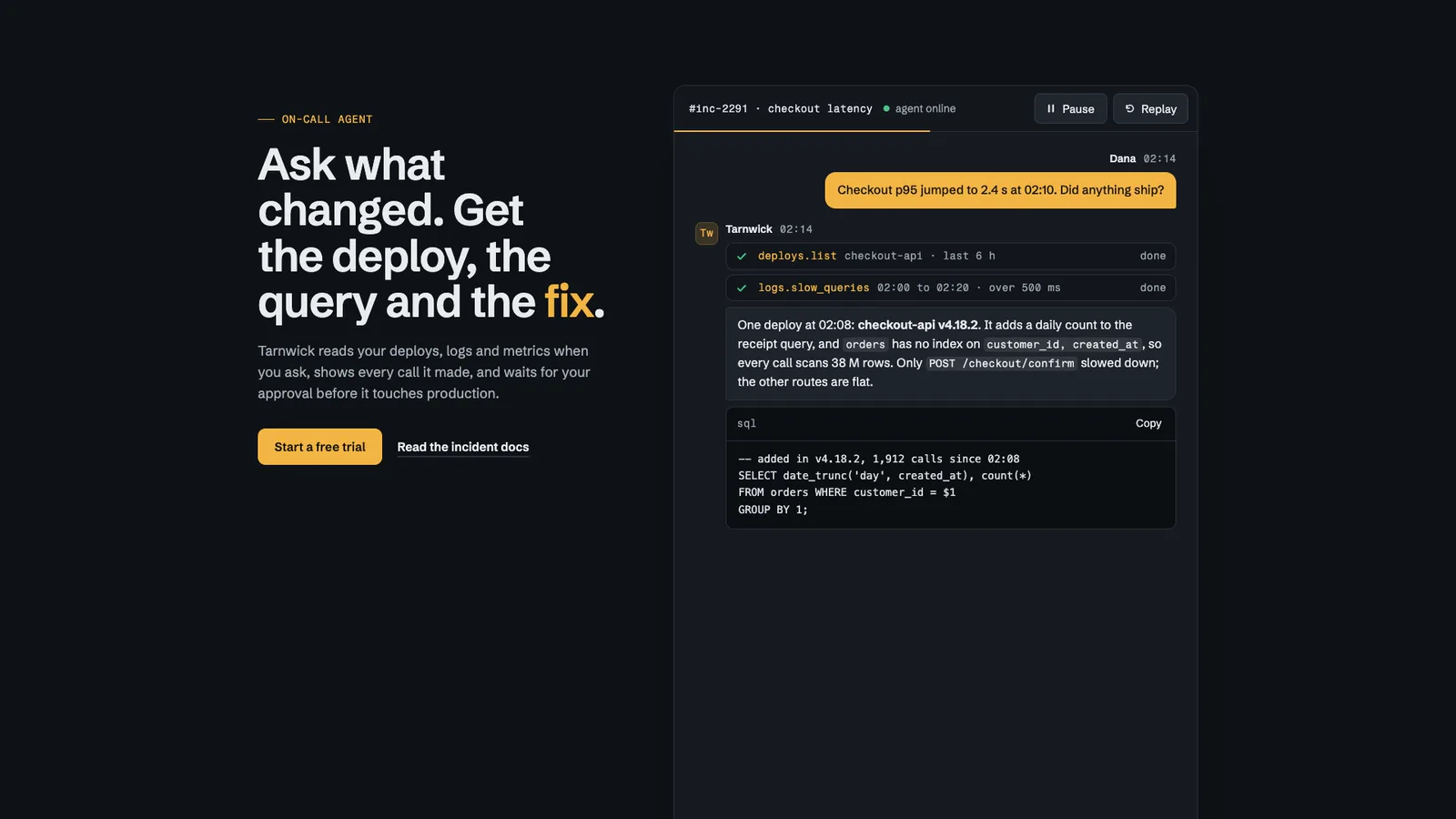
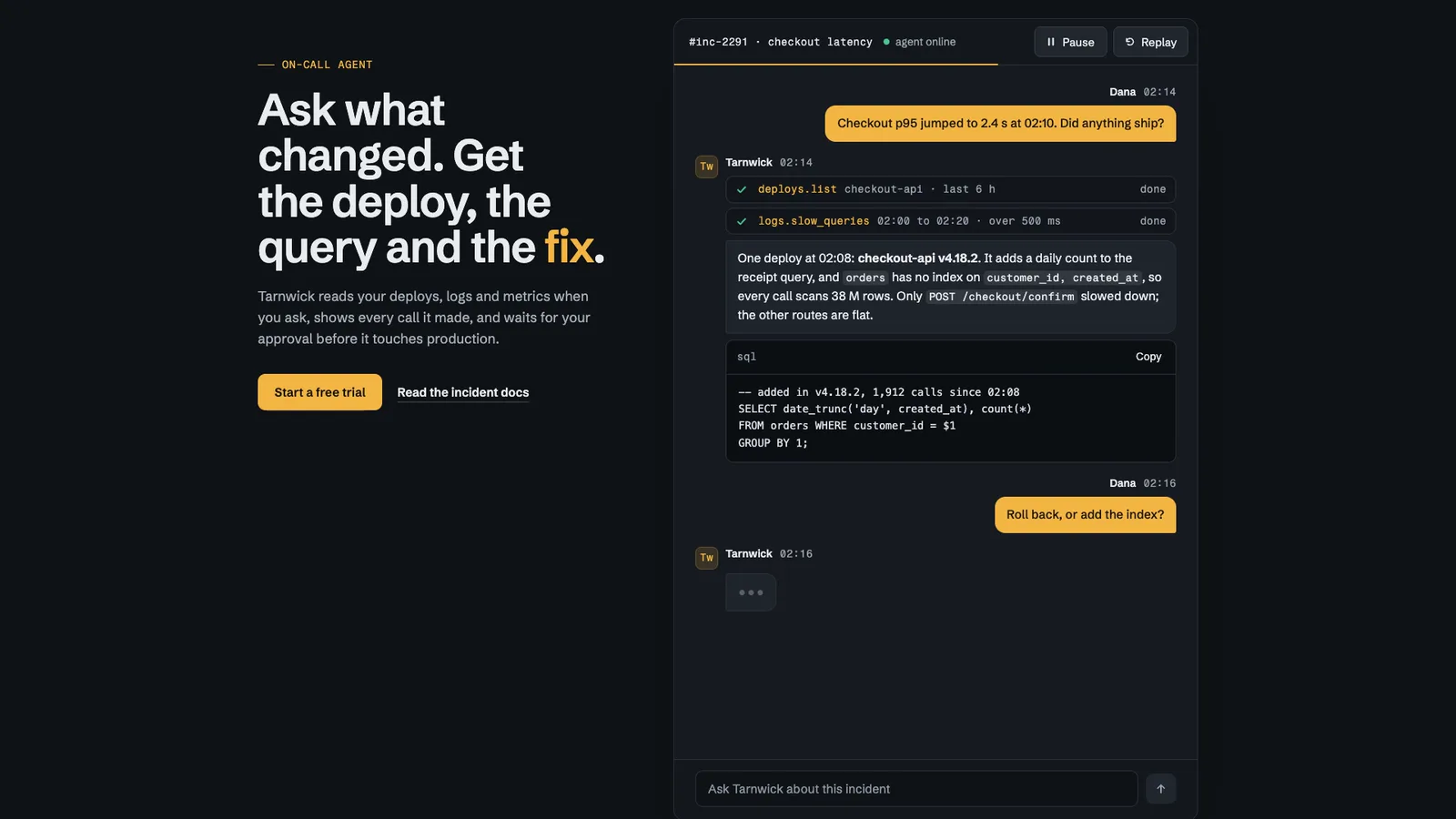
25.63-second example rendered by this skill from examples/tarnwick · 1280×720
Example settingswhat each example above was built from
examples/tarnwickchat.json
- Product
- Tarnwick
- Kicker
- On-call agent
- Style
- console
- Headline
- Ask what changed. Get the deploy, the query and the _fix_.
examples/pellorychat.json
- Product
- Pellory
- Kicker
- The kitchen assistant
- Style
- paper
- Headline
- Tell it what’s in the fridge. Get _dinner_, then the week.
What you get
- out/index.html, out/embed.html and out/react/ChatDemo.tsx with its CSS, from one chat.json
- Message bubbles in plain CSS: grouped runs, tails, avatars, names and times
- Typing dots, tool calls that spin then tick, a reply that streams in uneven chunks, a code block with Copy, file chips
- Pause and Replay buttons, and playback that stops off screen and goes on where it stopped
- The full transcript as real text for search engines and screen readers, and the finished conversation with reduced motion
- Two finished styles, console and paper, each laid out its own way
- A build that refuses a broken conversation, with a self-test that proves 18 refusals
- Checks at 390, 768, 1024 and 1440 px for the transcript, playback, layout shift, contrast, focus and reduced motion, and a 1080p clip
- Open-source licenses for every part it builds on
Good fit
- Developer and operations agents that call tools, like Tarnwick: the console style shows each call, the streamed answer and the code it wrote.
- Consumer assistants that want a warm, readable conversation under the headline, as Pellory does in the paper style with bubbles that curl into tails.
- Teams that need a chatbot UI demo on a static site or in Next.js without shipping a model, a chat SDK or a video file.
Not for
- A working chatbot: the conversation is scripted from chat.json; nothing is sent to a model
- Long transcripts: 2 to 12 messages and about 90 seconds at most
- Other fonts and layouts: each style is the design; the words, timings and accent colour are yours
About this skill
A chat demo section for an AI product's landing page that your agent builds from one chat.json and drops into a site: a scripted conversation between a user and your assistant that plays when a visitor scrolls to it. The user's message is typed into the composer and sent, the assistant's bubble shows typing dots, each tool call appears with a spinner and then a tick, the reply streams in one to three words at a time with longer pauses after sentences, a code block arrives line by line with a working Copy button, and files arrive as chips. The message bubbles are plain CSS: runs of one speaker share tight inner corners, the last bubble of a run gets a tail (two pseudo-elements in the paper style), and avatars, names and times sit once per run. Pause and Replay are real buttons, playback stops when the window leaves the screen or the tab is hidden and goes on from the same word, and the window keeps the height of the finished conversation so nothing on the page moves. The whole transcript is real text in the HTML from the first paint, so search engines and screen readers get it once, never word by word; reduced motion and no JavaScript show the finished conversation. Two styles laid out differently: console, a dark operations window beside the copy with team-chat names and monospaced tool rows, and paper, a messaging app on warm paper under a serif headline. The build refuses a broken conversation (an unknown speaker, an empty or overlong message, a code block without a language, an unsafe link, a timing out of range, an accent without contrast), and the check tests four widths for the transcript, playback, pause, off-screen pause, replay, layout shift, contrast, focus and reduced motion.
Example request
Use the Chat Demo Section skill to add a chat demo to our landing page in the console style: a support lead asks our agent why refunds failed overnight, it calls our payments and logs tools, answers with the cause and a SQL fix, and offers the runbook as a file. Give me the embed and the Next.js component.
How it works
Your agent
- 1
Write the conversation with the person
Ask what the product really does in one exchange a visitor would recognise, and write it as it would happen.
- 2
Write chat.json
Copy the example closest in spirit and replace every value.
- 3
Build
It lists every problem at once and writes nothing until they're fixed.
- 4
Check
It opens the page at 390, 768, 1024 and 1440 px wide and with reduced motion at 390 and 1440, and fails on: script errors; a transcript on the first paint that isn't chat.json word for word (text, tools, files, code, speaker names); sideways scrolling; text under 16 px on a phone (14 px for names, times, avatars, tool calls, code and files) or 14 px elsewhere; text under WCAG AA contrast, while playing and when finished; text cut off or off the screen; a keyboard focus that can't be seen; a conversation that doesn't start when the window scrolls into view, doesn't stop on Pause, doesn't go on with Play, keeps playing off screen, doesn't come back on screen, doesn't reach the end with every part shown, or doesn't restart on Replay; a Copy button that doesn't answer; the section or window changing height while it plays, or anything outside the conversation shifting; and, with reduced motion, anything hidden, the buttons shown, an animation running or the clock moving.
- 5
Look at it
Open the address it prints.
- 6
Record the clip (optional)
Writes
out/preview.mp4(1920×1080, 30 fps, the length of the conversation) andout/poster.png. - 7
Put it on the site
Tell the person the section plays when it scrolls into view and stops off screen, that Pause and Replay work from the keyboard, that the transcript is real text for search engines and screen readers, and how long it plays.
- 1
You get
- out/index.html
- out/embed.html
- out/preview.mp4
- out/poster.png
- out/react/ChatDemo.tsx
- out/react/chat-demo.css
What you need
- Node.js 18 or newer. Nothing to install.
- Chrome, Chromium or Edge, for the check and the clip (the scripts find it; set
CHROME_PATHif they don't). - ffmpeg for the clip only (
brew install ffmpeg,winget install ffmpeg,apt install ffmpeg; or setFFMPEG_PATH). - Internet access when the page is opened, for the style's Google Fonts. Without them system fonts stand in.
Last checked Nov 12, 2026: the package’s own build and render commands ran and passed.
If something goes wrong
The build says the conversation plays too long
Shorten the assistant's messages or raise
timing.wps. Over 90 seconds nobody watches to the end.The build says the accent has too little contrast
In console the accent is text on the dark window, so it has to be light; in paper it is the user's bubble under light text, so it has to be dark.
It doesn't play
At least a third of the window has to be on screen; with reduced motion on, it never plays by design.
What’s in the download
- SKILL.md14.9 KBthese instructions.
- examples/
- examples/pellory/2.14 KB1 file
- examples/tarnwick/2.54 KB1 file
- kit/
- kit/base.css9.44 KBthe layout, the bubbles and the mechanics.
- kit/console.css6.11 KBthe two styles.
- kit/paper.css5.93 KB
- scripts/
- scripts/kit/
- scripts/kit/build.mjs15.7 KBthe markup, the HTML page, the embed and the React component.
- scripts/kit/cdp.mjs4.91 KBthe checks, recorder and helpers.
scripts/chrome.mjsfinds Chrome. - scripts/kit/check.mjs18.6 KB
- scripts/kit/record.mjs6.43 KB
- scripts/kit/runtime.js14.3 KBplayback, the Pause and Replay buttons, the off-screen pause, the reserved height, Copy, and the recorder's hooks.
- scripts/kit/schema.mjs9.40 KBevery field, its limit and the rules the build enforces.
- scripts/kit/selftest.mjs5.10 KB
- scripts/kit/serve.mjs2.48 KB
- scripts/kit/timeline.js4.03 KBthe timetable of the conversation (when each part arrives, the uneven streaming chunks, the named moments), run by the build and inlined into the page, so both always agree.
- scripts/build.mjs145 Bentry points; the work is in
scripts/kit/. - scripts/check.mjs145 B
- scripts/chrome.mjs3.63 KB
- scripts/record.mjs147 B
- scripts/selftest.mjs123 B
- scripts/serve.mjs145 B
- NOTICE.md1.04 KB
- TESTED.json450 B
23 files · 128 KB · installs to ~/.claude/skills/chat-demo-kit for Claude Code and ~/.agents/skills/chat-demo-kit for other agents
Credits and licenses: NOTICE.md plus any LICENSE files inside the ZIP.
Similar Skills
View allDetails
- Output
- Scripted AI chat demo from chat.json · CSS message bubbles with tails · typing dots, tool calls, streaming reply, code with Copy · pauses off screen · HTML, embed and React component
- Needs
- Node.js 18+, and Chrome for the checks; ffmpeg only for the clip
- Series
- Page Kits · 33 skills
- Updated
- Nov 17, 2026
- Checked
- Nov 12, 2026: its own commands ran and passed. That is a working check, not a security audit.
Written for
See all 31 agents that read skill folders.
Install guides
For your agent
Generates with
Installed it? Tell others how it went. Reviews come from people who installed this skill.
Write a reviewFAQ
Is the conversation a video or real text?
Real text. The whole transcript is in the HTML from the first paint, so search engines and screen readers read it; the runtime only decides which words are drawn yet.
Will it jump the page around as messages arrive?
No. The window keeps the height of the finished conversation from the start, and messages are laid out from the top, so nothing outside the window moves. The check measures it.
Can visitors stop it?
Yes. Pause and Replay are real buttons, it stops by itself when the window leaves the screen or the tab is hidden, and with reduced motion it shows the finished conversation.
Which agents is Chat Demo Section written for?
Any agent that reads SKILL.md folders, including Claude Code, Codex, Cursor, GitHub Copilot, Gemini CLI and OpenCode.
Do I own what I make with it?
Yes. Everything your agent makes with this skill is yours, including for client and commercial work.
What if it doesn’t work for me?
Email support@lookbk.dev within 7 days of buying and we’ll fix it or refund you.
Credits and licensesWritten by Lookbk
the section, both styles, the bubble CSS and the kit, all written for Lookbk. The fonts are from Google Fonts. Written by Lookbk, no third-party code.
Credits and licenses for the open-source software and fonts it uses are in NOTICE.md inside the download.