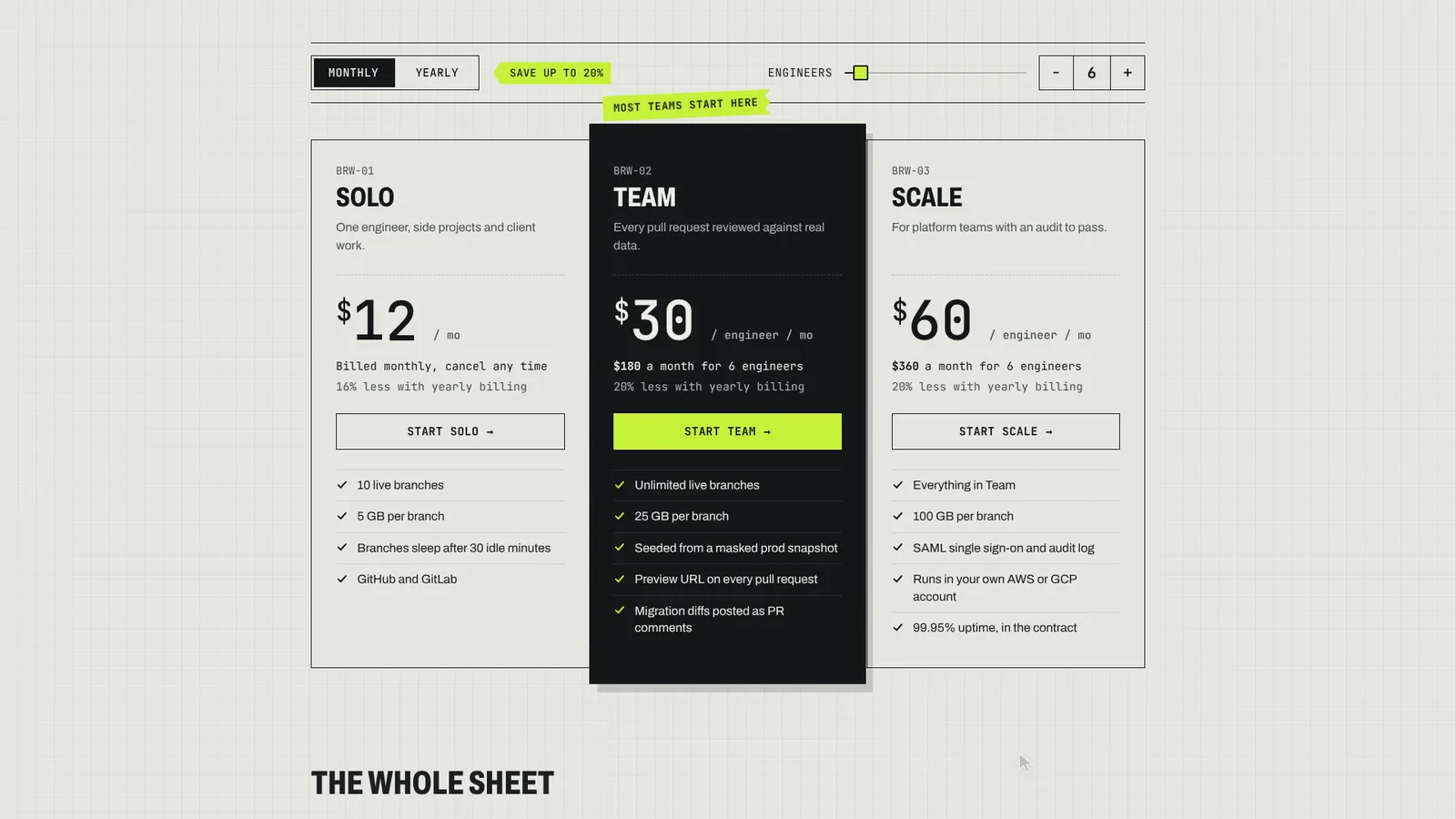
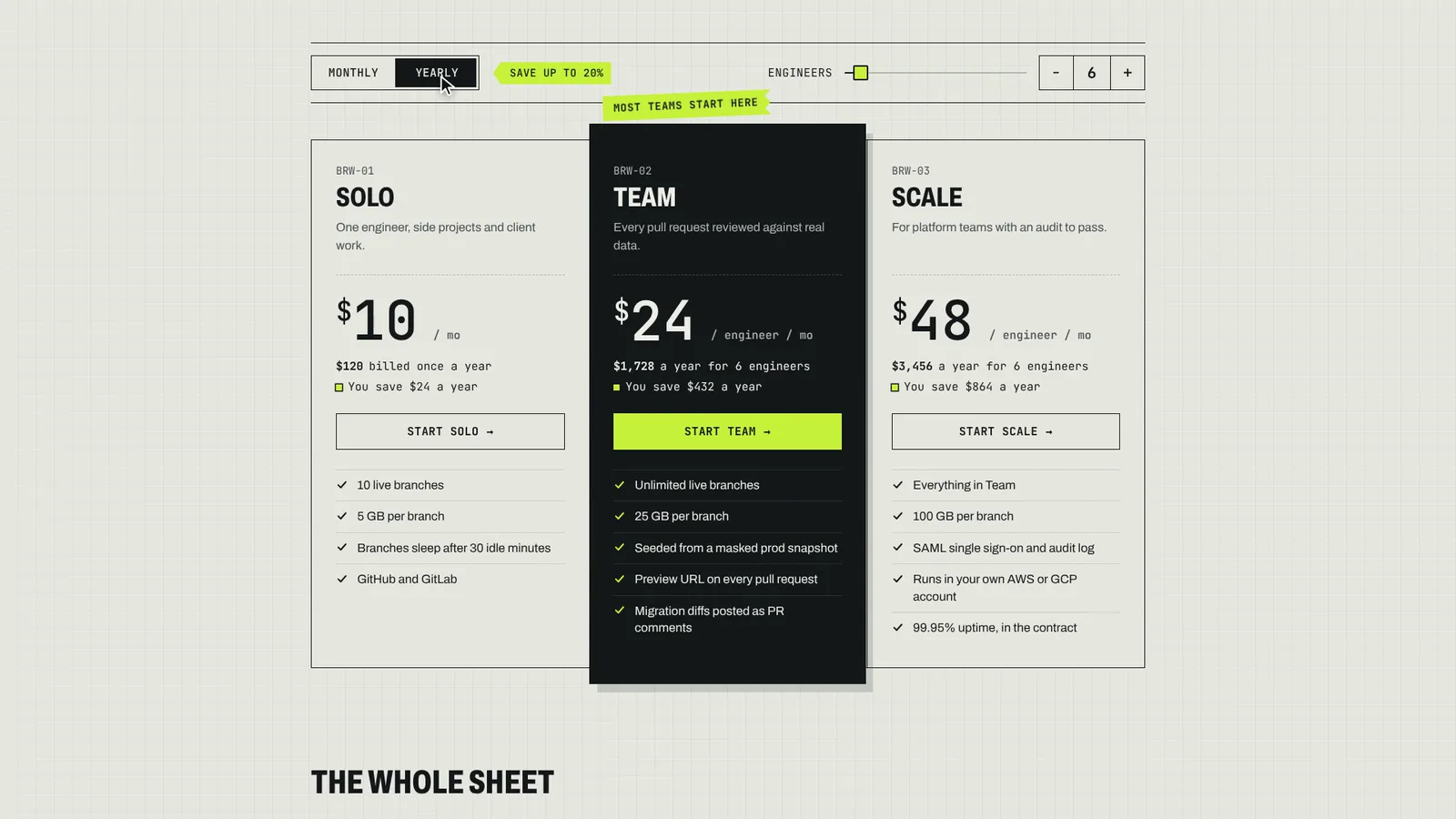
The page this skill built from examples/burrow, working in your browser. Opens in a new tab. Also: .
22.5-second example rendered by this skill from examples/burrow · 1280×720
Example settingswhat each example above was built from
examples/burrowpricing.json
- Product
- Burrow
- Kicker
- Pricing · sheet 04 · rev. 2026.11
- Style
- ledger
- Currency
- USD
- Headline
- A database for every pull request. Pay per _engineer_.
examples/plinthpricing.json
- Product
- Plinth
- Kicker
- Plinth · plans for studios
- Style
- gallery
- Currency
- EUR
- Headline
- Every studio gets a room. Choose its _size_.
What you get
- out/index.html, out/embed.html and out/react/PricingSection.tsx with its CSS, from one pricing.json
- A monthly/yearly switch with keyboard support whose prices and totals roll like a mechanical counter and are announced as text
- Yearly savings, totals and percentages computed from your prices, never typed
- Per-seat plans with a counter, and checkout links that change with the period
- Two finished styles, ledger and gallery, each with its own recommended-plan treatment
- A build that refuses a yearly price that is not lower, a plan without a checkout URL or a recommended plan that does not exist, with a self-test that proves it
- Checks at 390, 768, 1024 and 1440 px for contrast, overflow, focus, keyboard, remembered state and reduced motion, and a 1080p clip of the switch
- Open-source licenses for every part it builds on
Good fit
- Developer tools with per-seat plans get the ledger style, a seat counter and checkout links that change with the billing period, as in Burrow.
- Studios and creative apps get the gallery style: plans hung as framed prints, the recommended one under a spotlight, prices in euros or any currency.
- Teams adding pricing to an existing site paste the embed or render the React component, and keep pricing.json in the repository to change prices later.
Not for
- Taking payment: the buttons link to your checkout; nothing is charged here
- Pricing without a yearly discount, or usage-based pricing with meters and tiers
- More than four plans, or other fonts and layouts: each style is the design; the accent colour is yours
About this skill
An animated pricing section your agent builds from one pricing.json and drops into a site: plans with monthly and yearly prices, features, a recommended plan and the checkout links for each period (Stripe Payment Links, Paddle or Lemon Squeezy checkouts, or your own signup URLs). The billing switch is a real radiogroup that works with arrow keys, and switching rolls every price on a mechanical odometer whose wheels carry into each other, plan after plan. Every saving on the page, from the switch's "save up to 20%" to "You save $432 a year", is worked out from the prices, and the build refuses a phrase that types one. A seat counter multiplies the per-seat plans and rolls their totals, the choice is kept in the URL hash or localStorage, and a comparison table (one group open at a time on phones) and an FAQ sit underneath. Currency is formatted by Intl.NumberFormat in any ISO currency and locale. Two styles laid out differently: ledger, an engineering datasheet where the recommended column is pulled out of the sheet in reverse with a strip of label tape, and gallery, framed prints hung on a museum wall where the recommended one is lit by a spotlight that flickers on. The build fails with a clear message when a yearly price is not lower, a plan has no checkout URL or the recommended plan does not exist, and the check tests four widths for contrast, overflow, focus, keyboard, remembered state and reduced motion.
Example request
Use the Pricing Section skill to build our pricing section in the ledger style: our three plans in USD with monthly and yearly prices, Team and Scale per seat, our Stripe Payment Links for each period, the comparison table and five questions from support. Give me the embed and the Next.js component.
How it works
Your agent
- 1
Collect the prices and links
From the person, or from their current pricing page.
- 2
Write pricing.json
The other fields:
id(the section's anchor, defaultpricing),kicker,headline(up to 84 characters; one word in_underscores_gets the style's accent),intro,billing.default(monthlyoryearly),billing.persist(hash,storage,bothornone),compare({ "title", "groups": [ { "name", "rows": [ { "label", "values": [one per plan] } ] } ] }, wheretrueandfalsebecome a tick and a dash),faq({ "title", "items": [ { "q", "a" } ] }),footnote(taxes, currency), andcopyto reword any phrase the section prints around the numbers (the list isCOPYinscripts/kit/schema.mjs;{pct},{amount},{n},{unit}and{units}are filled in). - 3
Build
It lists every problem at once and writes nothing until they're fixed.
- 4
Check
It opens the page at 390, 768, 1024 and 1440 px wide and with reduced motion at 390 and 1440, and fails on: script errors; sideways scrolling; text under 16 px on a phone or 14 px elsewhere; text, prices included, under WCAG AA contrast (monthly and yearly); text cut off or off the screen; a digit wheel resting between two digits; a keyboard focus that can't be seen; a switch whose click or arrow keys don't change the period and move the focus; prices, totals, savings, screen-reader text or button links that don't match the prices and URLs in pricing.json after a switch or a seat change; a choice not remembered after a reload; a table group or a question that doesn't open and close; and, with reduced motion, prices that roll instead of changing at once.
- 5
Look at it
Open the address it prints.
- 6
Record the clip (optional)
Writes
out/preview.mp4(1920×1080, 30 fps, about 22 seconds) andout/poster.png. - 7
Put it on the site
Tell the person the switch works with a keyboard and a screen reader, which period it opens on and where the choice is remembered, and that every saving on the page is computed from their prices.
- 1
You get
- out/index.html
- out/embed.html
- out/preview.mp4
- out/poster.png
- out/react/PricingSection.tsx
- out/react/pricing-section.css
What you need
- Node.js 18 or newer. Nothing to install.
- Chrome, Chromium or Edge, for the check and the clip (the scripts find it; set
CHROME_PATHif they don't). - ffmpeg for the clip only (
brew install ffmpeg,winget install ffmpeg,apt install ffmpeg; or setFFMPEG_PATH). - Internet access when the page is opened, for the style's Google Fonts. Without them system fonts stand in.
Last checked Nov 7, 2026: the package’s own build and render commands ran and passed.
If something goes wrong
The build says the yearly price is not lower
yearlyis the price per month when billed yearly, not the yearly total. $288 a year is"yearly": 24.The build says a plan has no CTA URL
Every plan needs
cta.url, or bothcta.monthlyandcta.yearly; a custom plan needs at least one (a contact page ormailto:).The saving reads 16% where the person says "two months free"
12 → 10 saves 16.7%, and the section rounds down. Two months free is 10 months' price for 12: $12 a month becomes $10. The section shows what the numbers say.
What’s in the download
- SKILL.md15.0 KBthese instructions.
- examples/
- examples/burrow/5.15 KB1 file
- examples/plinth/4.62 KB1 file
- kit/
- kit/base.css9.84 KBthe layout and mechanics.
- kit/gallery.css12.0 KBthe two styles.
- kit/ledger.css13.3 KB
- scripts/
- scripts/kit/
- scripts/kit/build.mjs17.2 KBthe markup, the HTML page, the embed and the React component.
- scripts/kit/cdp.mjs4.91 KBthe checks, recorder and helpers.
scripts/chrome.mjsfinds Chrome. - scripts/kit/check.mjs19.2 KB
- scripts/kit/lines.js2.73 KBthe arithmetic and words around the numbers, run by the build and inlined into the page, so both always agree.
- scripts/kit/record.mjs6.40 KB
- scripts/kit/runtime.js25.7 KBthe switch, odometers, seats, remembering, reveals, table and questions, and the recorder's script.
- scripts/kit/schema.mjs12.1 KBevery field, its limit, the default phrases and the rules the build enforces.
- scripts/kit/selftest.mjs3.49 KB
- scripts/kit/serve.mjs2.48 KB
- scripts/build.mjs143 Bentry points; the work is in
scripts/kit/. - scripts/check.mjs143 B
- scripts/chrome.mjs3.63 KB
- scripts/record.mjs145 B
- scripts/selftest.mjs121 B
- scripts/serve.mjs143 B
- NOTICE.md1.13 KB
- TESTED.json411 B
23 files · 160 KB · installs to ~/.claude/skills/pricing-section for Claude Code and ~/.agents/skills/pricing-section for other agents
Credits and licenses: NOTICE.md plus any LICENSE files inside the ZIP.
Similar Skills
View allDetails
- Output
- Drop-in pricing section from pricing.json · odometer prices that carry digit into digit · computed yearly saving · seats, comparison table, FAQ · HTML, embed and React component
- Needs
- Node.js 18+, and Chrome for the checks; ffmpeg only for the clip
- Series
- Page Kits · 29 skills
- Updated
- Nov 10, 2026
- Checked
- Nov 7, 2026: its own commands ran and passed. That is a working check, not a security audit.
Written for
See all 31 agents that read skill folders.
Install guides
For your agent
Generates with
Installed it? Tell others how it went. Reviews come from people who installed this skill.
Write a reviewFAQ
How do the prices animate?
Each digit is a wheel driven by the price itself, like a mechanical counter, so $30 to $24 turns the units back through every digit and larger changes carry into the tens. With reduced motion they change at once.
Where does the yearly saving come from?
From the monthly and yearly prices in pricing.json. Every amount and percentage is computed and rounded down, and the build refuses a phrase that types a saving by hand.
Does it work with Stripe Payment Links?
Yes. Each plan takes one checkout URL, or one per billing period, and the button switches link with the period. The build fails if a plan has no URL.
Which agents is Pricing Section written for?
Any agent that reads SKILL.md folders, including Claude Code, Codex, Cursor, GitHub Copilot, Gemini CLI and OpenCode.
Do I own what I make with it?
Yes. Everything your agent makes with this skill is yours, including for client and commercial work.
What if it doesn’t work for me?
Email support@lookbk.dev within 7 days of buying and we’ll fix it or refund you.
Credits and licensesWritten by Lookbk
the section, both styles and the kit, all written for Lookbk. The fonts are from Google Fonts. Written by Lookbk, no third-party code.
Credits and licenses for the open-source software and fonts it uses are in NOTICE.md inside the download.